Note
Access to this page requires authorization. You can try signing in or changing directories.
Access to this page requires authorization. You can try changing directories.
After you break your documents into a collection of chunks, the next step is to enrich each chunk by cleaning it and augmenting it with metadata. Cleaning the chunks enables you to achieve better matches for semantic queries in a vector search. Adding metadata enables you to support searches of the chunks that go beyond semantic searches. Both cleaning and augmenting involve extending the schema for the chunk.
This article discusses various ways to augment your chunks, including some common cleaning operations that you can apply to chunks to improve vector comparisons. It also describes some common metadata fields that you can add to your chunks to augment your search index.
Note
This article focuses on vector-based retrieval-augmented generation (RAG) solutions. Strategies related to graph-based, agentic, tag-augmented generation (TAG), and other RAG solutions aren't in scope.
This article is part of a series. Read the introduction.
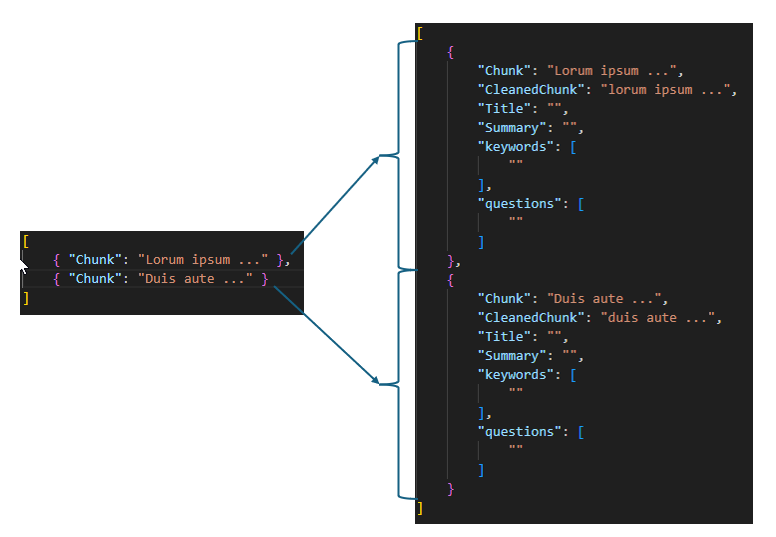
The following image shows a code sample of chunks that are enriched with data.
Clean your data
Cleaning your data helps your workload find the most relevant chunks, typically by vectorizing those chunks and storing them in a vector database. An optimized vector search returns only the rows in the database that have the closest semantic matches to the query. The goal of cleaning the data is to support closeness matches by eliminating potential differences that aren't material to the semantics of the text.
Note
To return the original, uncleaned chunk as the query result, add an extra field to store the cleaned and vectorized data.
Consider the following common cleaning procedures:
Implement lowercasing strategies. Lowercasing allows words that are capitalized, such as words at the beginning of a sentence, to match corresponding words within a sentence. Embeddings are typically case-sensitive, so "Cheetah" and "cheetah" result in different vectors for the same logical word. For example, for the embedded query "what is faster, a cheetah or a puma?" the embedding "cheetahs are faster than pumas" is a closer match than "Cheetahs are faster than pumas." Some lowercasing strategies lowercase all words, including proper nouns, and other strategies lowercase only the first words in sentences.
Guard against prompt injection attacks. If an attacker knows that a content repository is processed for indexing, the attacker can try to add content to the repository that includes instructions for your language models and agents to evaluate. Never use the data from your content as a source of instructions during any processing tasks.
Improve security with techniques like flagging or excluding media that contains embedded instructions. Consider using a language model with constrained decoding to classify and sanitize inputs.
Remove stop words. Stop words are words like "a," "an," and "the." You can remove stop words to reduce the dimensionality of the resulting vector. If you remove stop words in the previous example, "a cheetah is faster than a puma," and "the cheetah is faster than the puma," are vectorially equal to "cheetah faster puma." But it's important to understand that some stop words hold semantic meaning. For example, "not" might be considered a stop word, but it holds significant semantic meaning. You need to test to determine the effect of removing stop words.
Fix spelling mistakes. A misspelled word doesn't match with the correctly spelled word in the embedding model. For example, "cheatah" isn't the same as "cheetah" in the embedding. You should fix spelling mistakes to address this problem.
Remove Unicode characters. Remove Unicode characters to reduce noise in your chunks and reduce dimensionality. Like stop words, some Unicode characters might contain relevant information. It's important to conduct testing to understand the implications of removing Unicode characters.
Normalize text. Normalize text according to standards like expanding abbreviations, converting numbers to words, and expanding contractions, for example, expanding "I'm" to "I am." This approach can help improve the performance of vector searches.
Normalize localization. Prefer localizing at the document level and reprocessing each language separately. Avoid storing unvalidated translations. Ensure that your embedding model supports multilingual input.
Augment your chunks
Semantic searches against the vectorized chunks work well for some types of queries but not as well for others. Depending on the query types that you need to support, you might need to augment your chunks with extra information. The extra metadata fields are all stored in the same row as your embeddings and can be used in the search solution either as filters or as part of a search.
The following image shows the JSON of fully enriched content and describes how a search platform might use the metadata.
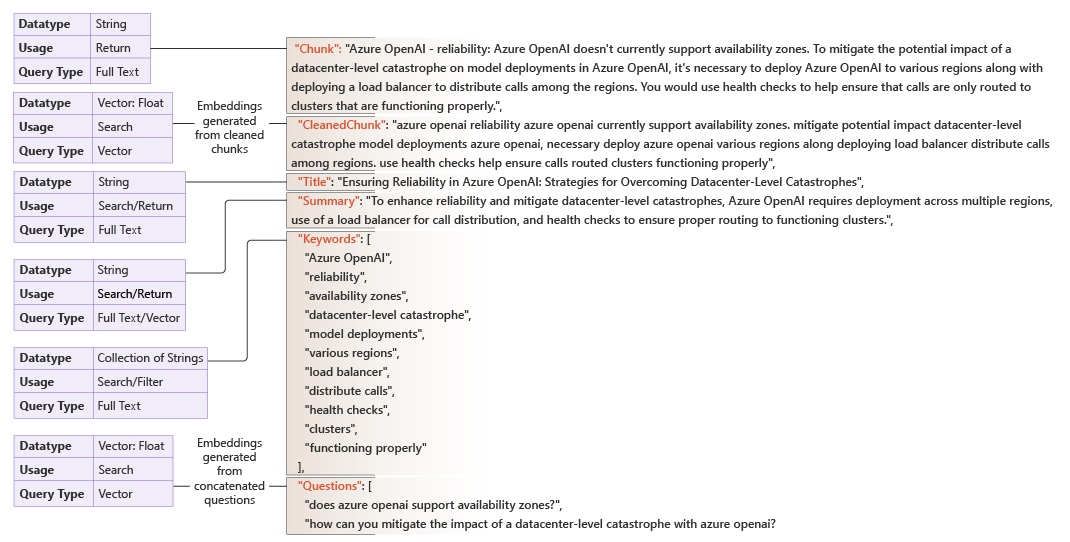
The metadata columns that you need to add depend on your problem ___domain, including the type of data you have and the types of queries you want to support. You need to analyze the user experience, available data, and result quality you're trying to achieve. From there, you can determine what metadata might help you address your workload's requirements.
The following list describes common metadata fields, the original chunk text, potential uses, and tools or techniques that generate the metadata content.
ID. An ID uniquely identifies a chunk. A unique ID is useful during processing to determine whether a chunk already exists in the store. An ID can be a hash of some key field. Tools: A hashing library.
Title. A title is a useful return value for a chunk. It provides a quick summary of the content in the chunk. The title can also be useful to query with an indexed search because it can contain keywords for matching. Tools: A language model.
Summary. The summary is similar to the title in that it's a common return value and can be used in indexed searches. Summaries are often longer than titles. Tools: A language model.
Rephrasing of the chunk. Rephrasing of a chunk can be helpful as a vector search field because rephrasing captures variations in language, such as synonyms and paraphrasing. Tools: A language model.
Keywords. Keyword searches are useful for data that's noncontextual, for searching for an exact match, and when a specific term or value is important. For example, an auto manufacturer might have reviews or performance data for each of its models for multiple years. "Review for product X for year 2009" is semantically like "Review for product X for 2010" and "Review for product Y for 2009." In this case, it's more effective to match on keywords for the product and year. Tools: A language model, RAKE, KeyBERT, multi-rake.
Tags. Tags can be keywords or classifiers, like Multipurpose Internet Mail Extensions (MIME) types. Using tags is helpful for hybrid search (vector + text) and advanced filtering. Tools: A language model.
Entities. Entities are specific pieces of information, like people, organizations, and locations. Like keywords, entities are good for exact match searches or when specific entities are important. Tools: spaCy, Stanford Named Entity Recognizer (Stanford NER), scikit-learn, and Natural Language Toolkit (NLTK).
Cleaned chunk text. The text of the cleaned chunk. Tools: A language model.
Questions that the chunk can answer. Sometimes, the embedded query isn't a close match to the embedded chunk. For example, the query might be small relative to the chunk size. It might be better to formulate the queries that the chunk can answer and do a vector search between the user's actual query and the preformulated queries. Tools: A language model.
Source. The source of the chunk can be valuable as a return for queries. Returning the source allows the querier to cite the original source.
Language. The language of the chunk can be useful as a filter in queries.
Generate metadata by using Azure Content Understanding
Many of the metadata fields described previously, such as titles, summaries, keywords, tags, and entities, traditionally require separate calls to language models, natural language processing libraries, or custom code. Each tool introduces its own integration, cost model, and maintenance overhead. As the number of metadata fields increases, so does the complexity of your enrichment pipeline.
Content Understanding provides an alternative approach. Rather than orchestrating multiple tools, you can define a single analyzer with a field schema that specifies all the metadata that you need. Content Understanding then processes your content and returns the enriched fields in one API call. This unified approach is especially useful when your pipeline handles multiple content types, because the same service processes documents, images, video, and audio.
Content Understanding supports three field extraction methods that map naturally to common metadata fields:
- Generate produces new values from the input content. Use this method for fields like titles, summaries, keywords, questions, and rephrased text.
- Classify categorizes content from a predefined set of categories that you define in the analyzer schema. Use this method for tags, document types, or sentiment labels.
- Extract pulls specific values as they appear in the source content. Use this method for entities like names, dates, amounts, and other structured data points. This method is supported for documents only.
For example, the following analyzer schema generates a title, a summary, and a list of keywords and classifies the document type, all in a single request:
{
  "baseAnalyzerId": "prebuilt-document",
  "description": "Chunk enrichment analyzer",
  "scenario": "document",
  "fieldSchema": {
    "fields": {
      "Title": {
        "type": "string",
        "method": "generate",
        "description": "A concise title for the content"
      },
      "Summary": {
        "type": "string",
        "method": "generate",
        "description": "A one-paragraph summary of the content"
      },
      "Keywords": {
        "type": "array",
        "method": "generate",
        "items": { "type": "string" },
        "description": "Key terms and concepts in the content"
      },
      "DocumentType": {
        "type": "string",
        "method": "classify",
        "description": "Category of the document",
        "enum": ["invoice", "contract", "report", "correspondence", "other"]
      }
    }
  }
}
The RAG-optimized analyzers in Content Understanding also provide prebuilt enrichment. The prebuilt-documentSearch analyzer automatically generates a one-paragraph summary alongside the extracted content, without requiring you to define a field schema. Similarly, the prebuilt-callCenter audio analyzer produces summaries, sentiment, topics, and entity lists out of the box. For the full list of prebuilt analyzers and their built-in fields, see Content Understanding prebuilt analyzers.
Each extracted field value includes a confidence score (ranging from 0 to 1) and source grounding that traces the value back to its ___location in the source content. These capabilities help you assess the quality of enriched metadata and decide whether a value can be trusted for automated processing or requires human review.
Consider multimodal enrichment recommendations
When you work with video, image, or audio media, consider the following recommendations.
- Generate descriptive text for each artifact and include localized translations.
- Generate multiple representations for each artifact.
The same Content Understanding approach described in the Generate metadata by using Azure Content Understanding section extends to multimodal content. Content Understanding provides specialized prebuilt analyzers for each modality, including prebuilt-imageSearch, prebuilt-videoSearch, prebuilt-audioSearch, and prebuilt-callCenter. For details on the capabilities of each modality, see Content Understanding document solutions, image solutions, video solutions, and audio solutions.
Calculate the cost of augmenting
Some language models that augment chunks can be expensive. You need to calculate the cost of each enrichment that you're considering and multiply it by the estimated number of chunks over time. Use this information, along with your testing of the enriched fields, to determine the best business decision.