Note
Access to this page requires authorization. You can try signing in or changing directories.
Access to this page requires authorization. You can try changing directories.
Defender for Cloud helps you identify and remediate vulnerabilities in container images stored in supported registries before deployment.
Vulnerability findings for registry images are shown as security recommendations in Defender for Cloud. The steps in this article use the Flat list recommendations view, which shows recommendations at the affected-resource level. Learn more about reviewing recommendations by title or by resource.
Note
During the transition from grouped to individual recommendations, you might see both recommendation formats in the portal. Learn more about transitioning from grouped to individual recommendations.
Prerequisites
Before you begin, make sure that Defender for Containers or Defender CSPM is enabled on your subscription with Registry access toggled on.
View and remediate vulnerabilities for registry images
Sign in to the Azure portal.
Go to Microsoft Defender for Cloud > Recommendations.
In the left pane, select Vulnerabilities.
Select the Flat list view.
Select Add filter.
Select Resource type.
Select Container Image.
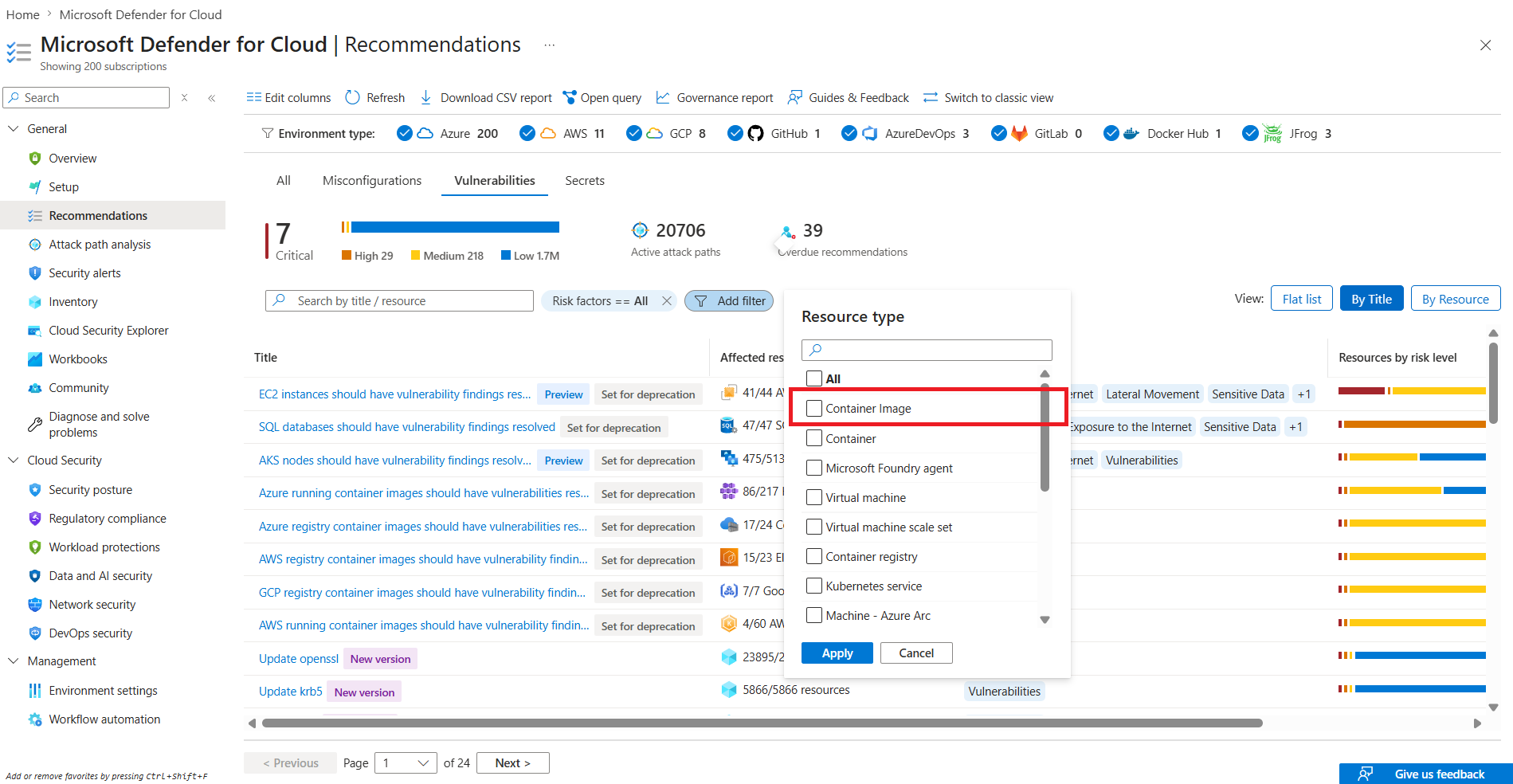
Select Apply.
Select a recommendation.
Review the recommendation details, including the risk information, remediation guidance, and recommendation metadata.
Select the Associated CVEs tab to review the CVEs associated with the recommendation.
Select a CVE to view details such as severity, affected components, and fix version information.
