Note
Access to this page requires authorization. You can try signing in or changing directories.
Access to this page requires authorization. You can try changing directories.
Applies to:  External tenants (learn more)
In the OpenID Connect protocol, claims communicate information about the end user. Claims are pieces of user information that an identity provider includes in the ID token it issues for that user. The ID token contains claims about the end user. During sign-up, these claims help uniquely identify the user and provide additional profile information. The values are stored in the corresponding user attributes in your directory.
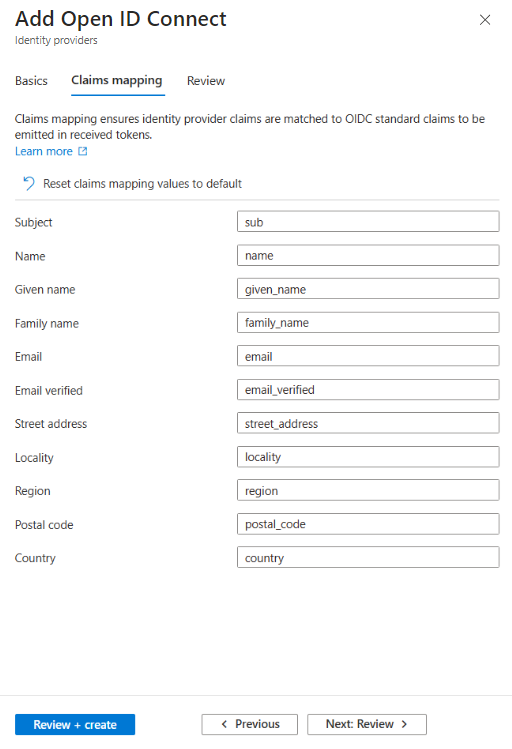
To set up claims mapping, create an identity provider (IdP) in your Microsoft Entra External ID tenant. The IdP configuration includes the Claims mapping section, where you can map standard OpenID Connect (OIDC) claims to the claims your identity provider provides in the ID token.
Claim and attribute mappings
Use the following table to map standard OpenID Connect claims to corresponding user flow attributes and your IdP claims.
| OIDC Standard Claim | User flow attribute | Description |
|---|---|---|
| sub | N/A | Subject - Identifier for the end-user at the Issuer. |
| name | Display Name | Full name in displayable form including all name parts, possibly including titles and suffixes, ordered according to the end-user's locale and preferences. |
| given_name | First Name | Given name(s) or first name(s) of the end-user. |
| family_name | Last Name | Surname(s) or family name of the end-user. |
| email (required) | Preferred e-mail address. | |
| email_verified | N/A | In the received ID token, the value of this claim is true if the end-user's e-mail address has been verified by the identity provider; otherwise, false. When this claim value is true, this means that your identity provider took affirmative steps to ensure that this e-mail address was controlled by the end-user at the time the verification was performed. If this claim value is false or not mapped to any claim from the identity provider, the user will not be able to create an account. A verified email address is required for account creation. If the email is missing or unverified, an error message appears. |
| phone_number | Phone number | The claim provides the phone number for the user. |
| phone_number_verified | N/A | In the received ID token, the value of this claim is true if the end-user's phone number has been verified; otherwise, false. When this claim value is true, this means that your identity provider took affirmative steps to verify the phone number. |
| street_address | Street Address | Full mailing address, formatted for display or use on a mailing label. In the token response, this field MAY contain multiple lines, separated by newlines. Newlines can be represented either as a carriage return/line feed pair ("\r\n") or as a single line feed character ("\n"). |
| locality | City | City or locality. |
| region | State or Province | State, province, prefecture, or region. |
| postal_code | ZIP or Postal Code | Zip code or postal code. |
| country | Country or Region | Country name. |
Note
For claims from the identity provider to be stored on the user object, the corresponding user flow attributes must be included in the user flow. First, map your external identity provider claims with the OIDC standard claims. Second, enable the corresponding user flow attributes in the user flow that the identity provider is attached to. If you don't want an attribute to be visible to the user during sign-up, you can hide the attribute while still keeping it in the user flow so the claim value is stored.
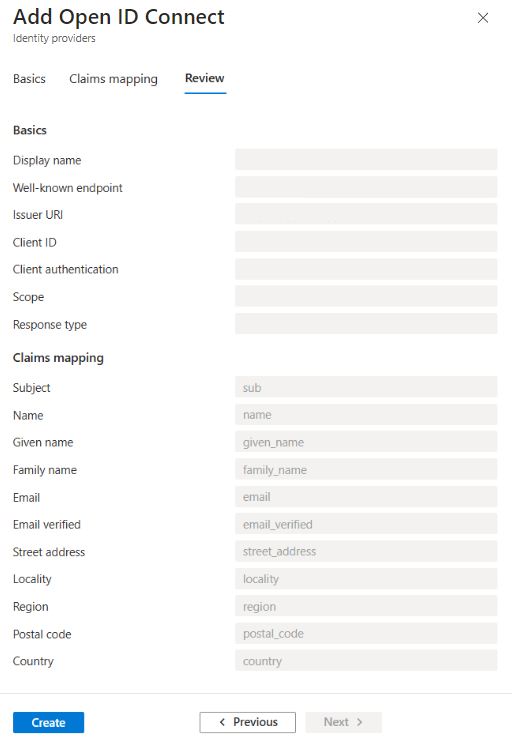
Review the identity provider
After you add the claims mapping, review the OIDC configuration on the Review tab. The Review tab displays the claims list and corresponding user flow attributes that you mapped to your IdP claims.