Note
Access to this page requires authorization. You can try signing in or changing directories.
Access to this page requires authorization. You can try changing directories.
Typically, queries sent to a Direct Lake semantic model are handled from an in-memory cache of the columns sourced from Delta tables. The underlying storage for a Delta table is one or more Parquet files in OneLake. Parquet files organize data by column rather than by row. Semantic models load entire columns from Delta tables into memory as queries require them.
Direct Lake on OneLake isn't coupled with the SQL endpoint. This architecture offers tighter integration with OneLake features such as OneLake security and more efficient DAX query plans because, for example, checking for SQL based security isn't required. DirectQuery fallback isn't supported by Direct Lake on OneLake.
With Direct Lake on SQL endpoints, a DAX query might use DirectQuery fallback, which involves seamlessly switching to DirectQuery mode. DirectQuery fallback retrieves data directly from the SQL analytics endpoint of the lakehouse or the warehouse. For example, fallback occurs when SQL based security is detected in the SQL endpoint. In this case, a DirectQuery operation sends a query to the SQL analytics endpoint. Fallback operations might result in slower query performance.
The following sections describe Direct Lake concepts and features, including column loading, framing, automatic updates, and DirectQuery fallback.
Column loading (transcoding)
Direct Lake semantic models load data from OneLake only when a query requests a column for the first time. This on-demand data loading process is known as transcoding.
When the semantic model receives a DAX (or Multidimensional Expressions—MDX) query, it first determines what columns are needed to produce a query result. Any column directly used by the query is needed, and also columns required by relationships and measures. Typically, the number of columns needed to produce a query result is significantly smaller than the number of columns defined in the semantic model.
Once it understands which columns are needed, the semantic model determines which columns are already in memory. If any columns needed for the query aren't in memory, the semantic model loads all data for those columns from OneLake. Loading column data is typically a fast operation, however it can depend on factors such as the cardinality of data stored in the columns.
Columns loaded into memory are then resident in memory. Future queries that involve only resident columns don't need to load any more columns into memory.
A column remains resident until there's reason for it to be removed (evicted) from memory. Reasons that columns might get removed include:
- The model or table was refreshed after a Delta table update at the source (see Framing in the next section).
- No query used the column for some time.
- Other memory management reasons, including memory pressure in the capacity due to other, concurrent operations.
Your choice of Fabric SKU determines the maximum available memory for each Direct Lake semantic model on the capacity. For more information about resource guardrails and maximum memory limits, see Fabric capacity requirements.
Framing
Framing gives model owners point-in-time control over what data loads into the semantic model. Framing is a Direct Lake operation that a refresh of a semantic model triggers. In most cases, it takes only a few seconds to complete. That's because it's a low-cost operation where the semantic model analyzes the metadata of the latest version of the Delta Lake tables and updates to reference the latest Parquet files in OneLake.
When framing occurs, the process might evict resident table column segments and dictionaries from memory if the underlying data changed. The point in time of the refresh becomes the new baseline for all future transcoding events. From this point, Direct Lake queries only consider data in the Delta tables as of the time of the most recent framing operation. For that reason, Direct Lake tables are queried to return data based on the state of the Delta table at the point of the most recent successful framing operation. That time isn't necessarily the latest state of the Delta tables.
The semantic model analyzes the Delta log of each Delta table during framing to drop only the affected column segments and to reload newly added data during transcoding. An important optimization is that dictionaries usually aren't dropped when incremental framing takes effect, and new values are added to the existing dictionaries. This incremental framing approach helps reduce the reload burden and benefits query performance. In the ideal case, when a Delta table receives no updates, no reload is necessary for columns already resident in memory. Queries show far less performance impact after framing because incremental framing essentially enables the semantic model to update substantial portions of the existing in-memory data in place.
Note
Framing can fail if a Delta table exceeds the Fabric capacity guardrails, such as when a Delta table has more than 10,000 parquet files. For more information about resource guardrails, see Fabric capacity requirements.
The following diagram shows how Direct Lake framing operations work.
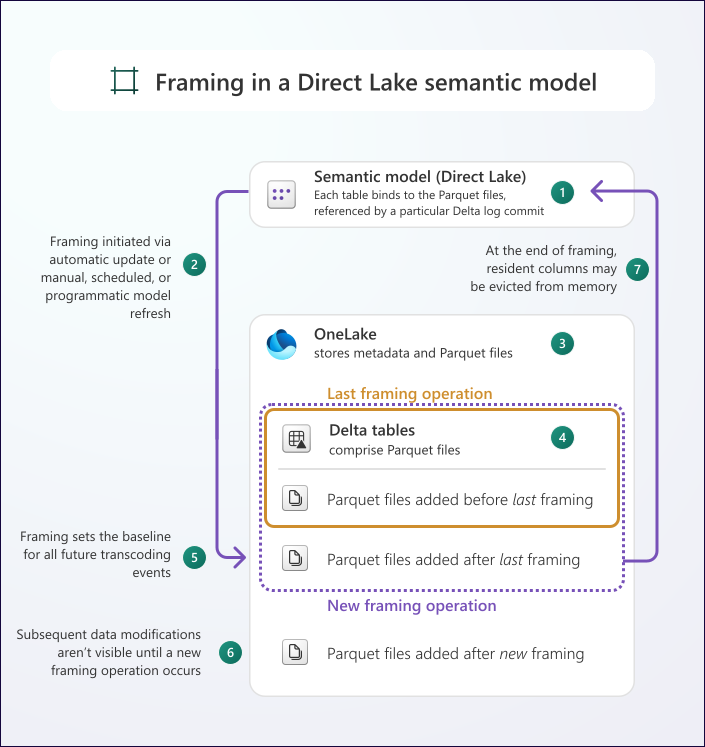
The diagram depicts the following processes and features.
| Item | Description |
|---|---|

|
A semantic model exists in a Fabric workspace. |

|
Framing operations take place periodically, and they set the baseline for all future transcoding events. Framing operations can happen automatically, manually, on schedule, or programmatically. |

|
OneLake stores metadata and Parquet files, which are represented as Delta tables. |

|
The last framing operation includes Parquet files related to the Delta tables, and specifically the Parquet files that were added before the last framing operation. |

|
A later framing operation includes Parquet files added after the last framing operation. |

|
Resident columns in the Direct Lake semantic model might be evicted from memory, and the point in time of the refresh becomes the new baseline for all future transcoding events. |

|
Subsequent data modifications, represented by new Parquet files, aren't visible until the next framing operation occurs. |
It's not always desirable to have data representing the latest state of any Delta table when a transcoding operation takes place. Consider that framing can help you provide consistent query results in environments where data in Delta tables is transient. Data can be transient for several reasons, such as when long-running extract, transform, and load (ETL) processes occur.
You can refresh a Direct Lake semantic model manually, automatically, or programmatically. For more information, see Refresh Direct Lake semantic models.
Automatic updates
The semantic model includes a setting that automatically updates Direct Lake tables. It's enabled by default. This setting ensures that data changes in OneLake automatically appear in the Direct Lake semantic model. Disable automatic updates when you want to control data changes by framing, which the previous section explains. For more information, see Manage Direct Lake semantic models.
Tip
You can set up automatic page refresh in your Power BI reports. This feature automatically refreshes a specific report page, provided that the report connects to a Direct Lake semantic model (or other types of semantic model).
DirectQuery fallback
When you use Direct Lake on SQL endpoints, a query sent to a Direct Lake semantic model can fall back to DirectQuery mode. In this mode, the table no longer operates in Direct Lake mode. It retrieves data directly from the SQL analytics endpoint of the lakehouse or warehouse. Such queries always return the latest data because they're not constrained to the point in time of the last framing operation. However, fallback operations might result in slower query performance.
Important
If possible, always design your solution or size your capacity to avoid DirectQuery fallback. That's because it might result in slower query performance.
Direct Lake on OneLake runs exclusively in DirectLakeOnly mode and doesn't support DirectQuery fallback. For new semantic models, it's the recommended Direct Lake option.
When Direct Lake mode is used
Queries stay in Direct Lake mode (avoiding DirectQuery fallback) only when all of the following conditions are true:
- The semantic model doesn't reference any tables that have SQL row-level security (RLS) defined at the SQL analytics endpoint.
- The semantic model doesn't reference any tables that have SQL dynamic data masking (DDM) defined at the SQL analytics endpoint.
- The semantic model doesn't reference any tables that have SQL object-level security (OLS) defined at the SQL analytics endpoint.
- The semantic model doesn't reference any tables based on unmaterialized SQL views.
- No single table in the semantic model exceeds guardrail limits as defined in Fabric capacity requirements:
- Number of Parquet files is within limit.
- Number of row groups is within limit.
- Number of rows is within limit.
- You refreshed (framed) the semantic model after you created or modified the underlying Delta tables.
A single table that exceeds any guardrail limit prevents Direct Lake mode for the entire model.
Control fallback with DirectLakeBehavior
When Direct Lake conditions aren't met, the behavior of your semantic models depends on the DirectLakeBehavior setting. This setting only applies to Direct Lake on SQL endpoints.
Set the DirectLakeBehavior property to one of the following three values:
| Value | Description |
|---|---|
| Automatic | (Default) If conditions aren't met, the query silently falls back to DirectQuery mode. Reports continue to work, but performance might be slower. Use this mode in production to preserve functionality for your users. |
| DirectLakeOnly | If conditions aren't met, the query fails with an error. Use this mode during development to identify and resolve errors. |
| DirectQueryOnly | The query always uses DirectQuery mode. Use to this mode during development to measure fallback performance. |
Set DirectLakeBehavior
In the Model view, open the Properties pane for the semantic model and change the Direct Lake behavior setting.
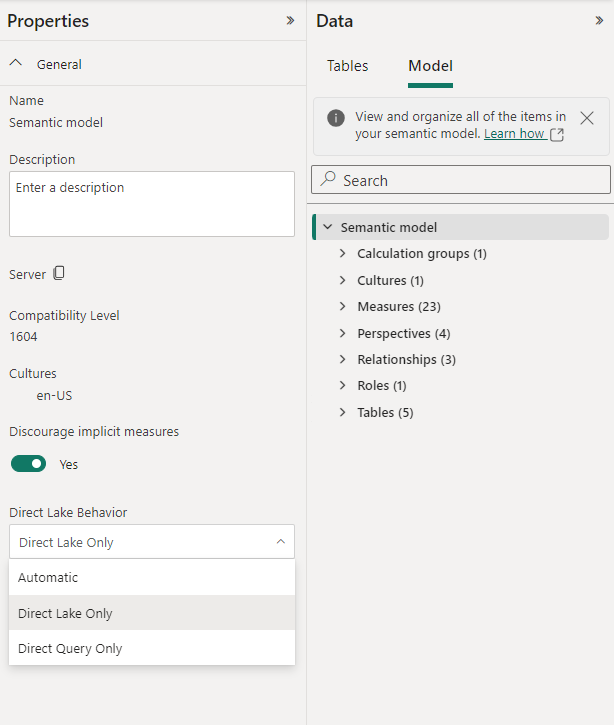
Set DirectLakeBehavior programmatically
You can also configure the DirectLakeBehavior property by using Tabular Object Model (TOM) or Tabular Model Scripting Language (TMSL).
The following example specifies all queries use Direct Lake mode only:
// Disable fallback to DirectQuery mode.
database.Model.DirectLakeBehavior = DirectLakeBehavior.DirectLakeOnly;
database.Model.SaveChanges();
For more information, see Model.DirectLakeBehavior Property.
Diagnose fallback
To identify which tables are falling back and why, run the following DAX query:
EVALUATE TABLETRAITS()
The [DirectLakeFallbackInfo] column shows the fallback reason for each table. A value of None means the table is using Direct Lake mode.
Fix common fallback causes
Use this table to identify the fix for each fallback scenario:
| Fallback cause | How to fix |
|---|---|
| Table isn't framed | Refresh the semantic model to frame the tables. After adding tables programmatically via TOM or TMSL, always refresh before querying. |
| Table is based on a SQL view | Materialize the view as a delta table, or accept DirectQuery performance for that table. |
| Table doesn't exist | Verify the delta table exists in the lakehouse or warehouse. Check for schema drift or deleted tables. |
| Transient error | Retry the query. If persistent, check capacity health and refresh the semantic model. |
| OLS defined at SQL endpoint | Move object-level security to the semantic model, or accept DirectQuery fallback. |
| RLS or DDM defined at SQL endpoint | Move row-level security to the semantic model, or accept DirectQuery fallback. |
| Delta table exceeds guardrails | Run OPTIMIZE and VACUUM on the delta table to reduce parquet files and row groups. If the table still exceeds limits, upgrade to a higher Fabric SKU. |
| Capacity under memory pressure | Reduce concurrent workloads, optimize other models, or upgrade the capacity SKU. |
For detailed query-level analysis using Performance Analyzer or SQL Server Profiler, see Analyze query processing for Direct Lake semantic models.