Note
Access to this page requires authorization. You can try signing in or changing directories.
Access to this page requires authorization. You can try changing directories.
Appropriate roles: Report viewer | Executive report viewer
In addition to Microsoft 365 Secure Productivity workloads, the AI Business Solutions & Security Insights extends its Growth Propensity and Land and Expand (LXP) based machine learning models for Microsoft 365 Copilot. The Copilot Opportunities experience offers tailored data and insights for marketing, sales, and customer success organizations to grow usage and upsell specifically Microsoft 365 Copilot along the entire customer life cycle. Hundreds of signals such as Microsoft 365 product usage, free usage, whitespace, agent usage, and licensing are distilled into actionable insights at account level.
Key models and data include:
- Total copilot eligible Microsoft 365 licenses and whitespace metrics to allow measurement of overall opportunity size
- Free and paid Copilot usage across licensed and unlicensed users at a tenant level, including free-to-paid whitespace
- Targeting scenarios for customers based on acquire/monetize/grow framework used by Microsoft sellers
- Propensity for Microsoft 365 Copilot license expansion or purchase
- Propensity for Microsoft 365 Copilot adoption for users currently not assigned to a license
- Time-to-value based assessment of account Microsoft 365 adoption status
- MCI incentive eligibility to propel Copilot adoption and license expansion
Copilot Opportunities tab data dictionary
Following is a view of the data available in the Copilot Opportunities tab:
Image 1 of 2
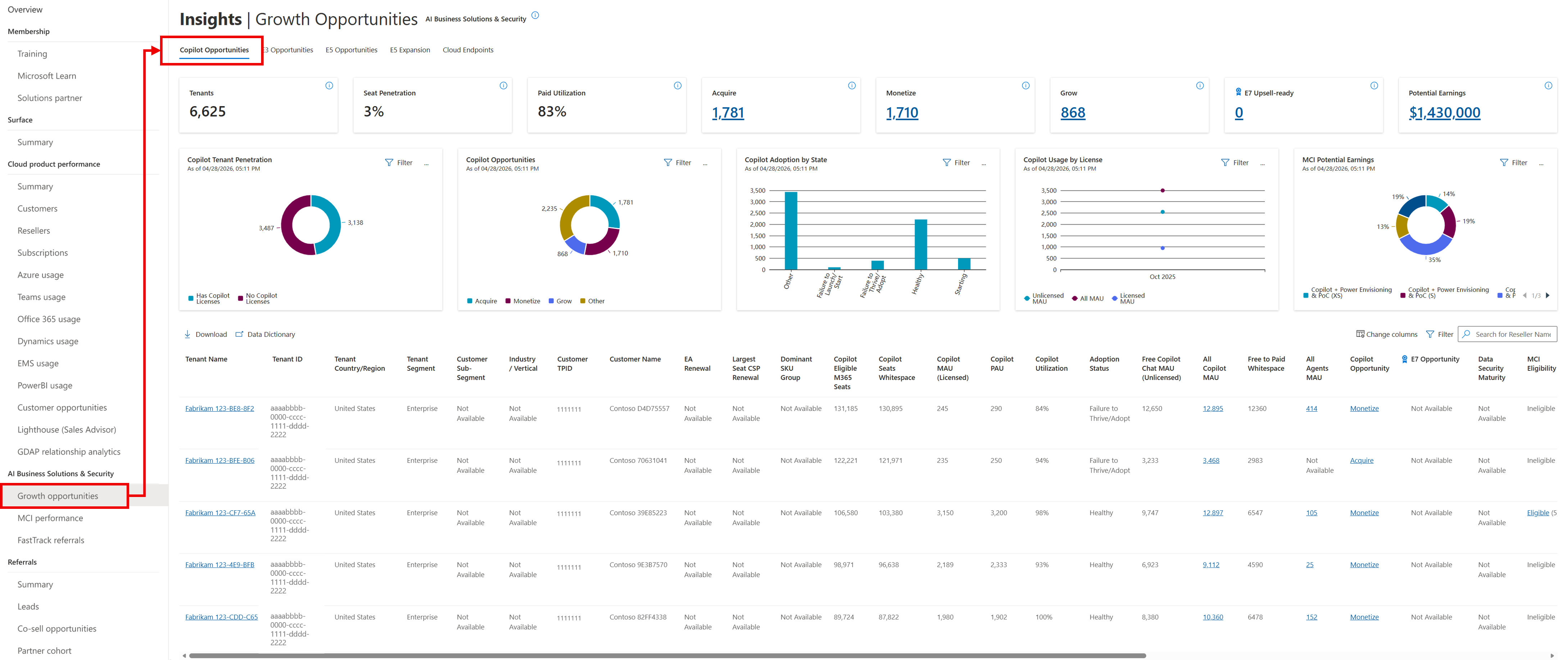
Image 2 of 2
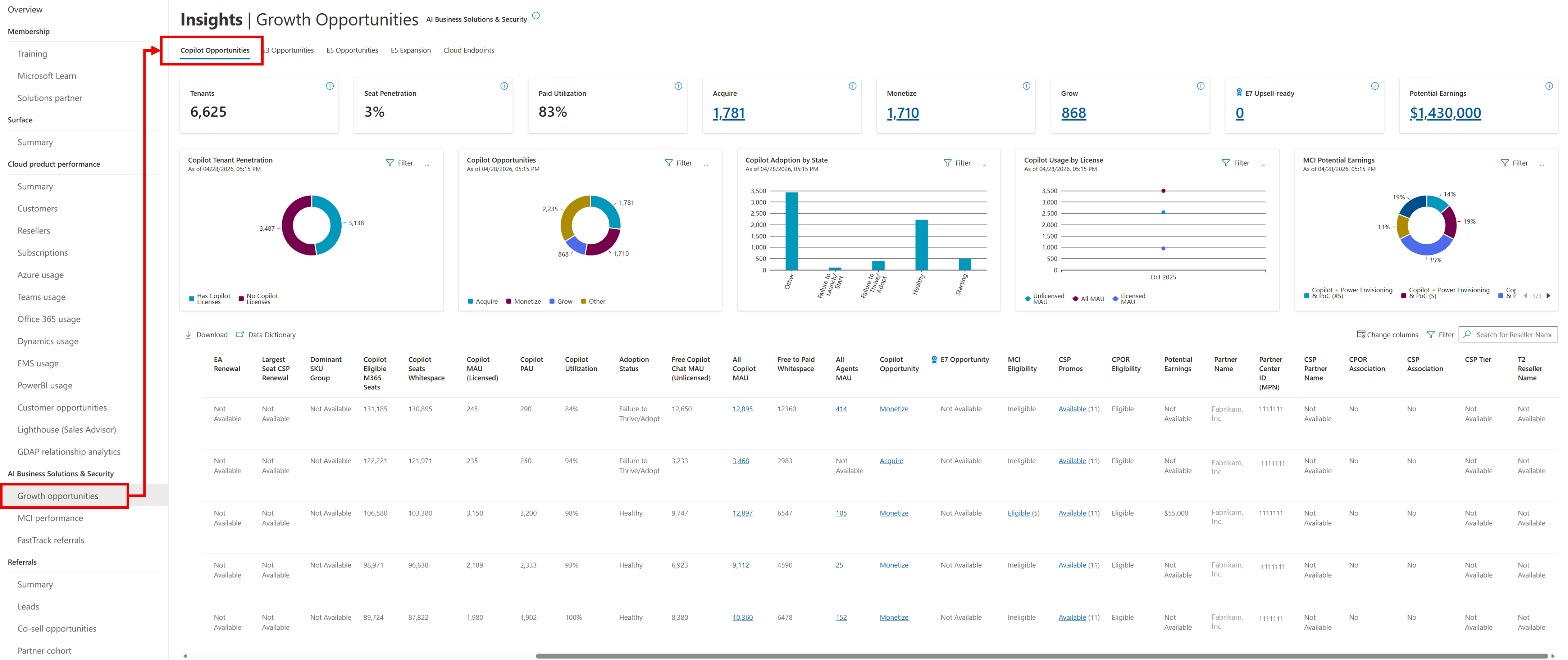
Details about these screenshots are included in the following sections.
Definitions
The following table describes the columns that are numbered in the preceding screenshots:
| Name | Definition |
|---|---|
| Copilot Opportunities tab | The Copilot Opportunities tab lists each Claiming Partner of Record (CPOR) and Cloud Solution Provider (CSP) associated tenant with any Copilot footprint. Using machine learning, propensity scores, and usage metrics, the data shows when each tenant is likely to add licenses or needs more engagement. |
| KPI tile: Tenants | Total number of tenants with some Copilot footprint, either through licenses or some free chat usage. |
| KPI tile: Seat Penetration | Total Copilot PAU / Copilot eligible Microsoft 365 licenses across all tenants. |
| KPI tile: Paid Utilization | The total ratio of MAU divided by PAU, capped at 100%, for all tenants and Land and Expand Growth Propensity Model workloads within the pipeline. Land and Expand Growth Propensity Model workloads are specifically identified workloads that have high correlation to upsell. |
| KPI tile: Acquire | Count of tenants in Acquire targeting scenario. These customers have high propensity to purchase and/or use Copilot, but they have low Chat MAU penetration and low Microsoft 365 paid license penetration. The recommendation here's to acquire the customer by growing the use of Copilot Free Chat. |
| KPI tile: Monetize | Count of tenants in Monetize targeting scenario. These customers have high propensity to purchase and/or use Copilot and have penetrated Copilot Chat but not penetrated with Microsoft 365 paid licenses. The recommendation here's to focus on monetizing the customer via agents or through paid Copilot licenses. |
| KPI tile: Grow | Count of tenants in Grow targeting scenario. These customers have high propensity to purchase and/or use Copilot and have notable penetration in Copilot Chat and paid Copilot licenses. The recommendation here's to focus on increasing the customer’s paid copilot licenses further. |
| KPI tile: E7 Upsell-ready | Tenants that meet criteria for an E7 upsell motion. These tenants have been identified based on their security licensing as well as agent intensity, which includes foundry signals. This KPI tile includes all E7 targeting scenarios, including E5 customers with low agent intensity, E5 customers with medium/high agent intensity, and E3 customers with high/medium agent intensity. |
| KPI tile: Potential Earnings | Potential earnings from all tenants via MCI engagements and CPOR usage incentives. This isn't a precise number, but more an estimate of incentive earnings. This estimate isn't simply the sum of potential earnings in the following table, because one MCI engagement can span multiple workloads. Thus, partners can't sum potential earnings across workloads, only across tenants. |
| Tenant Name | Name of the customer tenant as entered by the customer when the tenant was first created. |
| Tenant ID | Unique identifier of a customer tenant that contains all the unique users, domains, and subscriptions, and is administered by the tenant admin. |
| Tenant Country/Region | The country/region assigned to the tenant when the tenant was first created. |
| Tenant Segment | Indicates how Microsoft classifies the customer tenant segment. |
| Customer Sub-Segment | Represents Microsoft’s standardized customer sub-segment classification at the customer Top Parent Organization ID (TPID) level. This is used to group customers into comparable market tiers for segmentation, targeting, and prioritization. |
| Industry/Vertical | Indicates the customer’s primary industry or vertical at the customer TPID level, enabling industry-specific segmentation, filtering, and go-to-market analysis within ASPX. |
| TPID | The TPID is associated with the Tenant ID. For any given Tenant ID on any given date, there's only one customer TPID. |
| Customer Name | Name of the customer TPID. |
| EA Renewal | Month when the Microsoft Enterprise Agreement (EA) is up for renewal. This data only shows if the tenant has the partner's name listed as the EA reseller. |
| Largest Seat CSP Renewal | Month when the largest (by license count) Cloud Solutions Provider (CSP) subscription is up for renewal. This data is only visible if the tenant has the partner name listed as the CSP provider for the subscription. This applies to all Microsoft 365 related subscriptions only. |
| Dominant SKU Group | Based on the tenant's largest license by license count, a categorization of the customer into the following: - Business Basic (BB), Business Standard (BS), Business Premium (BP) - Office 365 E1, Office 365 E3 - Office 365 E3 + Enterprise Mobility + Security - Office 365 E1 + Enterprise Mobility + Security/Office 365 E1 Plus - Microsoft 365 E3 (ME3) or ME3 + Mini-bundles (Microsoft Purview Suite) - Microsoft 365 E5 |
| Copilot Eligible M365 Seats | The total number of Microsoft 365 licenses within a tenant that meet the licensing prerequisites for Microsoft 365 Copilot. This capacity represents the potential base for Copilot activation and adoption. |
| Copilot Seats Whitespace | The gap between Copilot-eligible licenses and users currently licensed for Copilot. This metric highlights untapped opportunities for upsell and expansion within existing Microsoft 365 deployments. |
| Copilot MAU (Licensed) | MAU is the measure, determined by Microsoft product telemetry, of unique signed-in users who have taken one or more intentional actions in the last rolling 28 days. The intentional action establishes clear user intent to perform a specific business action. MAU only measures licensed users (can be free trial) as well. |
| Copilot PAU | PAU is the measure of paid licenses assigned to a tenant that is revenue associated. PAU is always less than or equal to the number of licenses because PAU doesn't count trial licenses, promotional licenses, step-up SKUs, or any unpaid subscription. Also, PAU requires the license to be assigned to a user and requires the service plan to be enabled in the tenant admin portal. Since paid licenses fluctuate due to billing cycles, PAU smooths these fluctuations by applying logic that removes cyclical impacts. |
| Copilot Utilization | The ratio of MAU divided by PAU, capped at 100%. |
| Adoption Status | Specifically for tenants with paid licenses, this provides a Machine-Learning estimate on whether a tenant is thriving with Copilot adoption or struggling with adoption. This field is based on the expected time-to-value of the customer for Microsoft 365 Copilot, which uses various signals about the customer's usage profile. There are various adoption statuses. See the following definitions for each: - Healthy = Tenant on track to hit 80% MAU / PAU by one year - Failure to Start = Haven't broken 10% MAU / PAU in history - Failure to Adopt = Not on track to reach 80% MAU / PAU by one year, or has not made a significant purchase for an extended period of time. - Failure to Adopt but Last Month Gain = Failing to thrive but bump in usage last month - Healthy but Last Month Drop = Is healthy but drop in usage last month - Healthy but Negative Slope = Is healthy but sloping downwards - Big Gain & Big Drop = Big gain and big drop observed in the past - Starting = Recent purchase and more data is needed |
| Free Copilot MAU (Unlicensed) | This provides the MAU that a customer has, based on free chat usage, which doesn't require Microsoft 365 Copilot licenses. MAU is the measure, determined by Microsoft product telemetry, of unique signed-in users who have taken one or more intentional actions in the last rolling 28 days. The intentional action establishes clear user intent to perform a specific business action. |
| All Copilot MAU | The sum of licensed and unlicensed Copilot MAU. Select for a further breakdown of Copilot usage by product, for the tenant. |
| Free to Paid Whitespace | This calculates the percentage of Copilot usage that's free and unlicensed. This metric is calculated as follows – Unlicensed Copilot MAU / (Unlicensed Copilot MAU + Copilot PAU). The higher this percentage, the more whitespace is available for free to paid conversion monetization. |
| All Agents MAU | The sum of licensed and unlicensed Copilot MAU. Select for a further breakdown of Copilot usage by product, for the tenant. |
| Copilot Opportunity | This field is a Microsoft recommendation of whether the next step should be to focus on acquiring, monetizing, or growing the customer along the Copilot journey. See Copilot Opportunity Details flyout for more details. |
| E7 Opportunity | This field, which is also a clickable flyout panel, describes the E7 opportunity, which can be one of three different targeting scenarios: - ME5 with H/M agent intensity: Tenants with E5 and evidence of Azure Foundry agent usage, strong candidates for E7 upsell now, and are top priority. - ME3 with H/M agent intensity: Tenants with evidence of Azure Foundry agent usage, but not primarily on E5 licenses. These tenants are second in priority. - ME5 with low agent intensity: Tenants with E5 maturity and Copilot penetration, but not high agent usage. These tenants are third priority. The flyout panel has additional details including agent intensity, Copilot penetration, and Microsoft Entra penetration for additional insights. |
| Data Security Maturity | Data Security maturity describes the tenant's security license profile and usage of key data security features, which are part of Purview. Data Security Maturity can have multiple values: - Advanced-Healthy: Customer has advanced Security Licensing (ME5 or ME3 + Purview/Defender/Security Suite) and has Microsoft Information Protection (MIP) Plan 2 (P2) and Insider Risk Management (IRM) features usage meeting usage tipping points. - Advanced-Unhealthy: Customer has advanced Security Licensing (ME5 or ME3 + Purview/Defender/Security Suite) and does not have MIP P2 and IRM features meeting usage tipping points. - Limited-Healthy: Customer has Limited Security Licensing (Office 365 E3, ME3, BP, or Office 365 + Enterprise Mobility + Security (EMS)) and has MIP Plan 1 (P1) + P2 features meeting usage tipping points. - Limited-Unhealthy: Customer has Limited Security Licensing (Office 365 E3, ME3, BP, or Office 365 + EMS) and does not have MIP P1 + P2 features meeting usage tipping points. - Minimal: Customer does not have dominant licensing with any data security features. |
| MCI Eligibility | Eligibility of the tenant and workload for one or more MCI engagements. This eligibility depends on the eligibility of the partner and customer, taking into account geography as well. Eligibility is automatically calculated based on whether the claiming partner country/region is within a customer's headquarters area*. Partners claiming customers outside of their headquarters area may be paused or removed from Microsoft Commerce Incentives. *See slide 32 "Microsoft Area Mapping" in the Microsoft Commerce Partner Incentives Guide available at https://aka.ms/MCI. |
| CSP Promotions | List of all active new Commerce Cloud Solution Provider (CSP) promotions related to this solution area. Active promotions do not necessarily meet the eligibility criteria for this tenant. Review the New commerce promotions article in Partner Center for a complete list of eligible promotions across products. |
| CPOR Eligibiity | Eligibility of the tenant and workload for CPOR claim. All CPOR claimable workloads may not be eligible for incentives. See CPOR Potential Earnings Column or Potential Earnings Column for this information. |
| Potential Earnings | Potential earnings from all tenants via MCI engagements and CPOR usage incentives. This isn't a precise number, but more an estimate of incentive earnings. This estimate isn't simply the sum of potential earnings in the following table, because one MCI engagement can span multiple workloads. Thus, partners can't sum potential earnings across workloads, only across tenants. |
| Partner Name | This is the name of the associated Partner Center ID (MPN). The associated partner is the partner on the specific claim with the tenant. This partner name is typically at a regional level. This could be a CPOR claim, a CSP association or more. Sometimes, the same tenant may be associated with multiple partner IDs within your organization. Most commonly, if your organization has multiple lines of business (for example, CSP reseller and service based via CPOR), the same tenant may have different partner IDs for the CSP association and the CPOR association. Sometimes, these different MPNIDs are eligible for different incentives, which is why they're shown separately. |
| Partner Center ID (MPN) | This is the associated Partner Center ID (MPN). The associated partner is the partner on the specific claim with the tenant. This partner name is typically at a regional level. This could be a CPOR claim, a CSP association or more. Sometimes, the same tenant may be associated with multiple partner IDs within your organization. Most commonly, if your organization has multiple lines of business (for example, CSP reseller and service based via CPOR), the same tenant may have different partner IDs for the CSP association and the CPOR association. Sometimes, these different MPNIDs are eligible for different incentives, which is why they're shown separately. |
| CPOR Association | Yes/No flag if this customer is associated with the partner via a CPOR claim. |
| CSP Association | Yes/No flag if this customer is associated with the partner via a CSP association. |
| CSP Tier | If this is associated via CSP, a breakdown of which customers are associated as a distributor or as a reseller. |
| T2 Reseller Name | For tier 2 CSP associations, this is the name of the T2 reseller. This data is only visible if the tenant has the partner name listed as the CSP provider for the subscription. This applies to all Microsoft 365 related subscriptions only. |
Definitions (hidden columns)
To view the hidden columns, select the Change Column icon, then select the columns to display or download, as shown in the following screenshot:
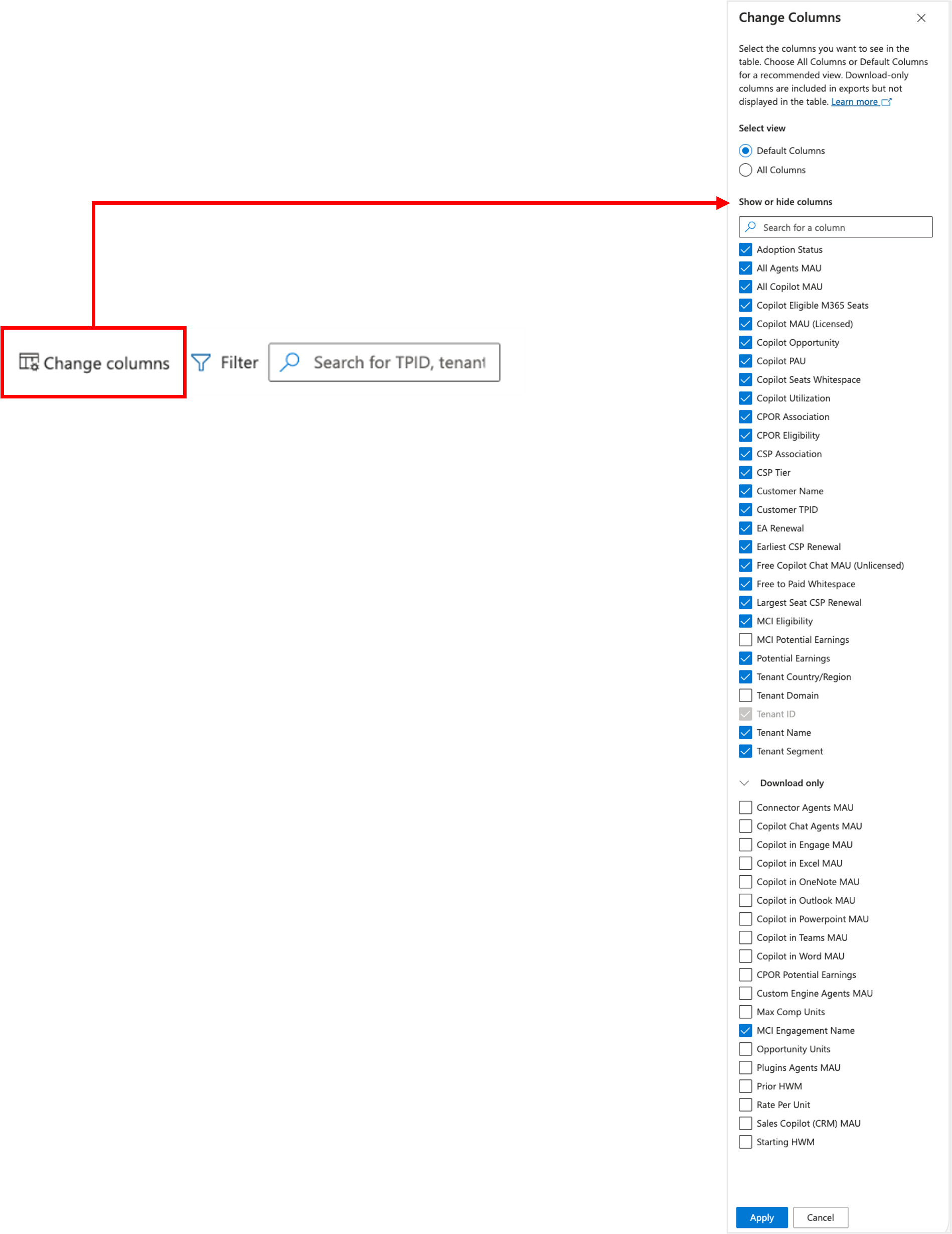
| Column Name | Description |
|---|---|
| MCI Potential Earnings | Potential Earnings of the specific MCI engagement based on program rates and geography of the partner. |
| Tenant Domain | The email ___domain of the tenant. |
| Connector Agents MAU | MAU for Copilot agents that leverage connectors to pull data from external systems (for example, CRM, ERP, or third-party apps). |
| Copilot Chat Agents MAU | Monthly Active Users interacting with Copilot through the Chat interface (for example, Copilot in Microsoft 365 Chat or Business Chat). |
| Copilot in Engage MAU | MAU for Copilot in Viva Engage, supporting community engagement and content creation. |
| Copilot in Excel MAU | MAU for Copilot in Excel, including data analysis, formula generation, and visualization assistance. |
| Copilot in OneNote MAU | MAU for Copilot in OneNote, including note summarization, organization, and content generation. |
| Copilot in Outlook MAU | MAU for Copilot features in Outlook, including email drafting, summarization, and scheduling assistance. |
| Copilot in PowerPoint MAU | MAU for Copilot in PowerPoint, such as creating presentations, designing slides, and summarizing content. |
| Copilot in Teams MAU | MAU for Copilot features embedded in Microsoft Teams, such as summarizing chats, generating meeting notes, or drafting responses. |
| Copilot in Word MAU | MAU for Copilot in Word, focusing on content generation, rewriting, and document summarization. |
| CPOR Potential Earnings | Calculated by multiplying a workload's opportunity units by the rate per unit for a specific workload. This calculation provides an estimation of the earnings a partner could potentially receive for servicing a customer's Microsoft cloud environment under the CPOR program. |
| Custom Engine Agents MAU | MAU for custom-built Copilot agents created by organizations using Microsoft’s extensibility frameworks. |
| Max Comp Units | The maximum compensable units for usage incentives. |
| MCI Engagement Name | List of Microsoft Commerce incentivized Modern Work and Security engagements for which both partner and customer are eligible. |
| Opportunity Units | The available number of units for usage incentives (PAU minus Prior High Water Mark). |
| Plugins Agents MAU | MAU for Copilot agents using plugins to extend functionality beyond native Microsoft 365 capabilities. |
| Prior High Water Mark (HWM) | The highest all-time recorded MAU for a particular service or subscription within a specified time frame before a certain event, such as the start of a new billing cycle or the date of a partner association. The Prior HWM snapshot is taken at the beginning of each month and serves as a benchmark used to measure growth or decline in usage over time. It's also used to determine the baseline from which growth is measured for incentive calculations. |
| Rate per Unit | The rate of usage incentive available for each compensable unit of active usage. |
| Sales Copilot (CRM) MAU | MAU for Microsoft Sales Copilot, which integrates with CRM systems (Dynamics 365 or Salesforce) to assist sellers with insights, summaries, and recommendations. |
| Starting High Water Mark (HWM) | The highest all-time MAU before the partner association date. It's a benchmark used to measure the initial level of usage or engagement that a partner brings to the table when they begin their association with Microsoft. |
| Earliest CSP Renewal | Month when the earliest (by subscription end date) CSP subscription is up for renewal. This data is only visible if the tenant has the partner name listed as the CSP provider for the subscription. This applies to all Microsoft 365 related subscriptions only. |
| Non-Profit Pricing | Tenants that are eligible for non-profit pricing across their Microsoft subscriptions. This is a specific list that may not align with the tenant industry/vertical. |
Charts
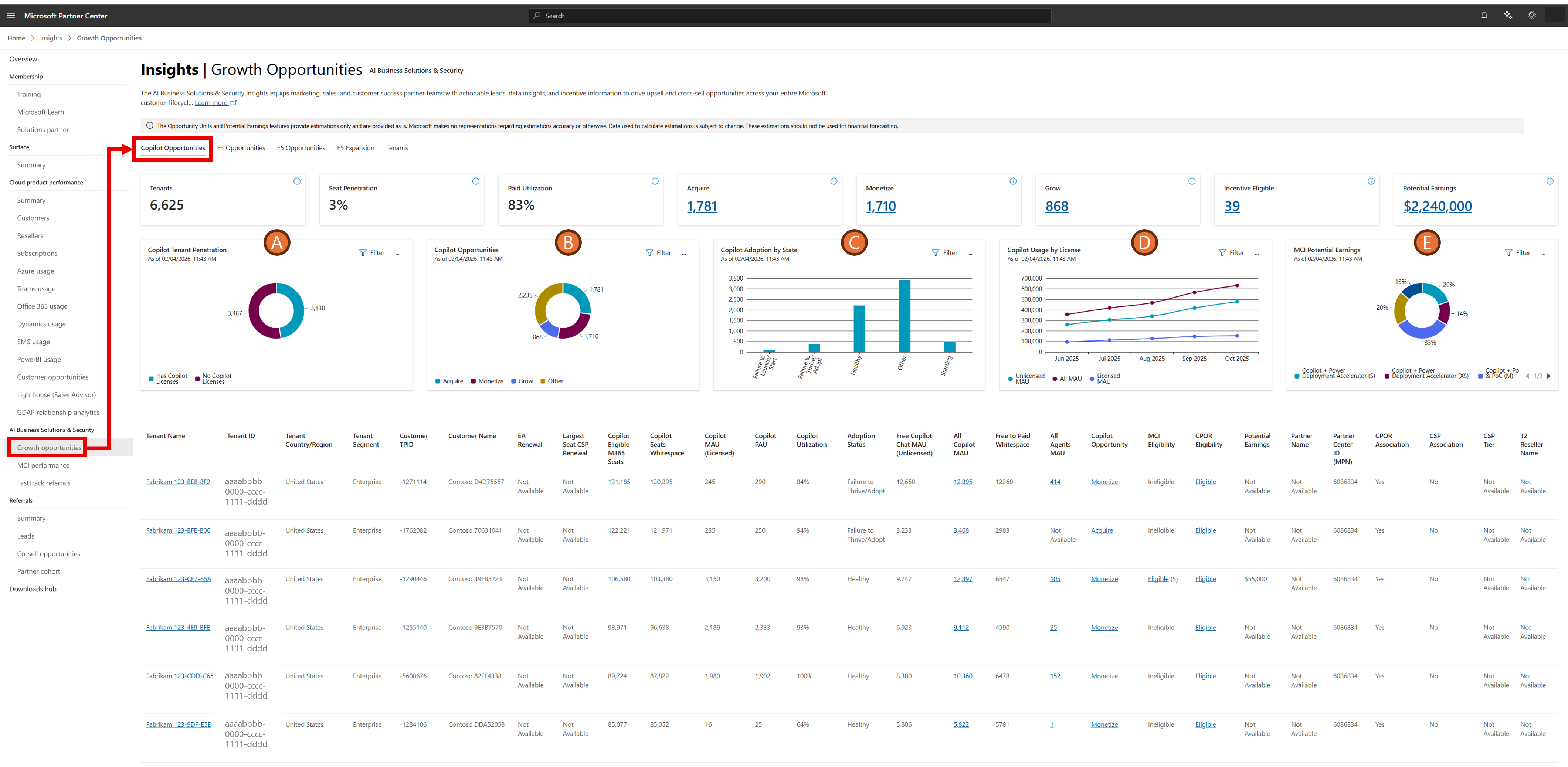
| Label | Column Name | Description |
|---|---|---|
| A. | Copilot Tenant Penetration | Visualizes the number of tenants that have PAU > 0 as a percentage of Copilot pipeline. |
| B. | Copilot Opportunities | Maps the tenant counts based on the acquire/monetize/grow targeting scenarios and propensity. |
| C. | Copilot Adoption by State | Shows tenant counts broken up by adoption state. Specifically for tenants with paid licenses, this provides a Machine-Learning estimate on whether a tenant is thriving with Copilot adoption or struggling with adoption. This field is based on the expected time-to-value of the customer for Microsoft 365 Copilot, which uses various signals about the customer's usage profile. |
| D. | Copilot Usage by License | Plots the historical view of Copilot usage across tenants, by product, so you can track if you're improving usage and converting from free to paid. |
| E. | MCI Potential Earnings | Potential Earnings of the specific MCI engagement based on program rates and geography of the partner. |
All Copilot MAU data dictionary
The total Copilot MAU includes licensed and unlicensed users.
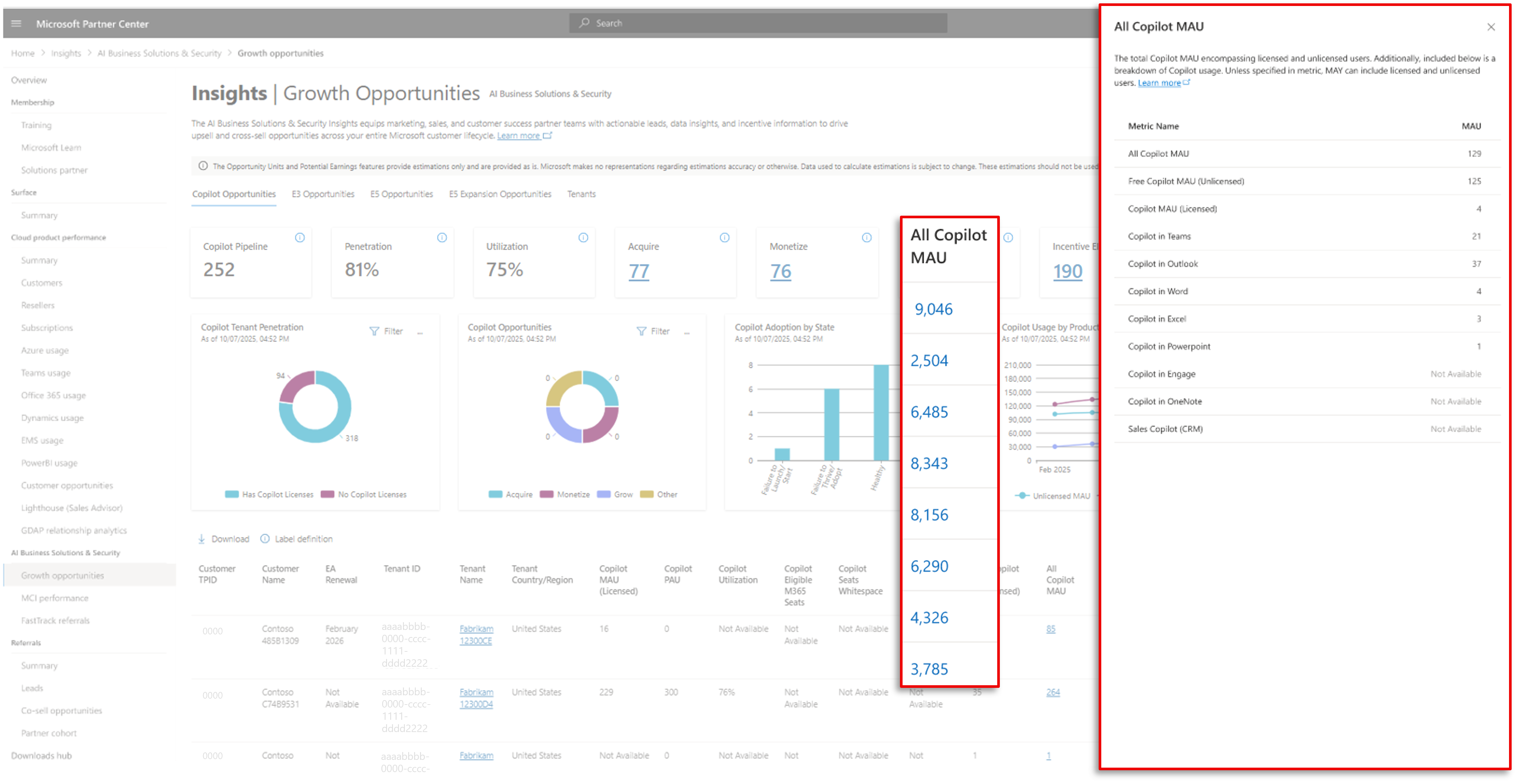
| Column Name | Description |
|---|---|
| All Copilot MAU | The sum of licensed and unlicensed Copilot MAU. Select for a further breakdown of Copilot usage by product, for the tenant. |
| Free Copilot MAU (Unlicensed) | This provides the MAU that a customer has based on free chat usage, which doesn't require Microsoft 365 Copilot licenses. MAU is the measure, determined by Microsoft product telemetry, of unique signed-in users who have taken one or more intentional actions in the last rolling 28 days. The intentional action establishes clear user intent to perform a specific business action. |
| Copilot MAU (Licensed) | MAU is the measure, determined by Microsoft product telemetry, of unique signed-in users who have taken one or more intentional actions in the last rolling 28 days. The intentional action establishes clear user intent to perform a specific business action. MAU only measures licensed users (can be free-trial) as well. |
| Copilot in Teams | Monthly active usage of Copilot features specifically via Teams – for example, a user may leverage Copilot functionality within Teams Meetings. |
| Copilot in Outlook | Monthly active usage of Copilot features specifically in Outlook, for example, drafting replies to messaging and summarizing emails. |
| Copilot in Word | Monthly active usage of Copilot features specifically in Word, for example, helping customers create and edit content, such as preparing sales meetings documents. |
| Copilot in Excel | Monthly active usage of Copilot features specifically in Excel, for example, creating spreadsheets, managing budgets, and visualizing data. |
| Copilot in PowerPoint | Monthly active usage of Copilot features specifically in PowerPoint, for example, helping users create, refine, and edit presentations. |
| Copilot in Viva Engage | Monthly active usage of Copilot features specifically in Viva Engage, for example, personalized suggestions of what to post on Viva Engage and where, along with help crafting and editing posts. |
| Copilot in OneNote | Monthly active usage of Copilot features specifically in OneNote, for example, helping users generate summaries, create tasks, and organizing notes into new content like presentation outlines. |
| Sales Copilot (CRM) | Monthly active usage of Copilot for Sales, natively in the CRM, for example, a user may leverage Copilot for Sales in their Dynamics 365. |
Copilot Opportunity data dictionary
The Copilot Opportunity value is the primary call-to-action (CTA) that encapsulates various machine learning inputs. This value should provide direction on what next steps to take with this customer opportunity. Selecting the Copilot Opportunity values in the table opens a flyout pane that provides visibility into the data science models that power the propensity as well as key penetration metrics that highlight why the customer is categorized as acquire, monetize, or grow.
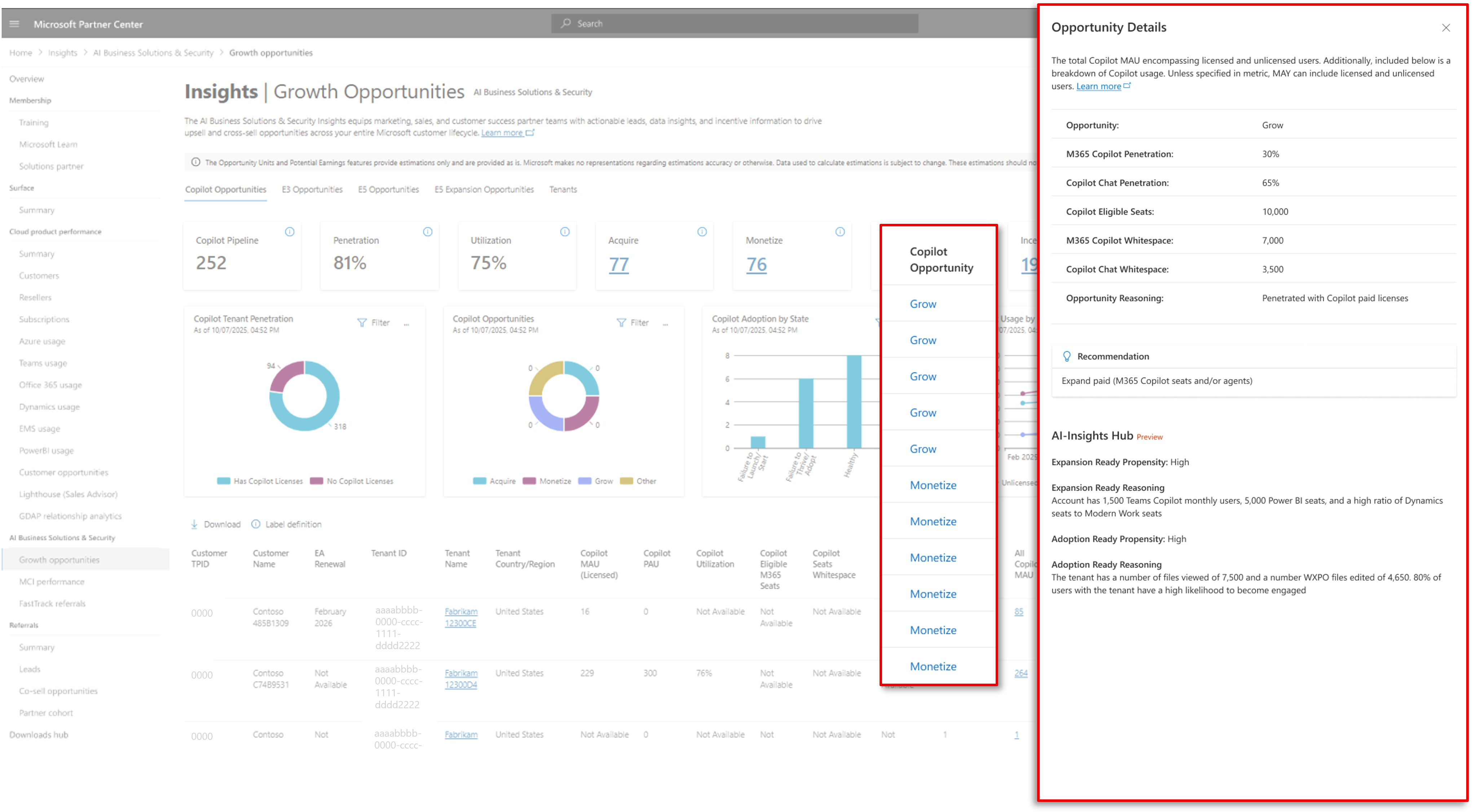
Copilot Opportunity: This field is a Microsoft recommendation of whether the next step should be to focus on acquiring, monetizing, or growing the customer along the Copilot journey.
Acquire: These customers have high propensity to purchase and/or use Copilot, but they have low Chat MAU penetration and low Microsoft 365 paid license penetration. The recommendation here's to acquire the customer by growing the use of Copilot Free Chat.
Monetize: These customers have high propensity to purchase and/or use Copilot and have penetrated Copilot Chat but not penetrated with Microsoft 365 paid licenses. The recommendation here's to focus on monetizing the customer via agents or through paid Copilot licenses.
Grow: These customers have high propensity to purchase and/or use Copilot and have notable penetration in Copilot Chat and paid Copilot licenses. The recommendation here's to focus on increasing the customer’s paid copilot licenses further.
Other: These tenants do not meet the propensity threshold for targeting scenarios.
M365 Copilot Penetration: The number of Microsoft 365 Copilot paid available units / Copilot eligible licenses.
Copilot Chat Penetration: The Copilot Chat MAU / Copilot eligible licenses.
Copilot Eligible Seats: Total Microsoft 365 licenses that are eligible also to have a Microsoft 365 Copilot subscription. This is the total universe that can be sold Copilot.
M365 Copilot Whitespace: Total Microsoft 365 licenses that are eligible to have a Microsoft 365 Copilot subscription subtracted by paid available units of Microsoft 365 Copilot.
Copilot Chat Whitespace: Total Microsoft 365 licenses that are eligible to have a Microsoft 365 Copilot subscription subtracted by Copilot Chat MAU.
Opportunity Reasoning: Provides the reasoning why the Copilot Opportunity is Acquire, Monetize, or Grow.
Recommendation: Provides the next step recommendation for how to engage with this opportunity based on all the signals showcased in the flyout pane.
Expansion-Ready Propensity: The propensity of a tenant to purchase Microsoft 365 Copilot licenses, based on a Machine Learning (ML) model with various signals that correlate with Microsoft 365 Copilot license expansion.
Expansion-Ready Recommendation Reason: This is the machine generated recommendation based on machine learning data science models that leverage various correlated signals such as related workload and product usage to identify tenants with a higher likelihood to purchase Microsoft 365 Copilot. The reason is meant to increase model explainability – but is in preview and may not exhaustively capture the decision-making process of the model.
Adoption-Ready Propensity: The propensity of users who are currently not assigned to Microsoft 365 Copilot licenses to adopt Microsoft 365 Copilot, based on a Machine Learning (ML) model with various signals that correlate with Microsoft 365 usage.
Adoption-Ready Recommendation Reason: This is the machine generated recommendation based on machine learning data science models that leverage various correlated signals such as related workload and product usage to identify tenants with a higher likelihood to adopt Microsoft 365 Copilot. The reason is meant to increase model explainability – but is in preview and may not exhaustively capture the decision-making process of the model.
All Agents MAU data dictionary
Selecting the All Agents MAU values in the table opens a flyout pane with more details on the nature of agent usage within a tenant.
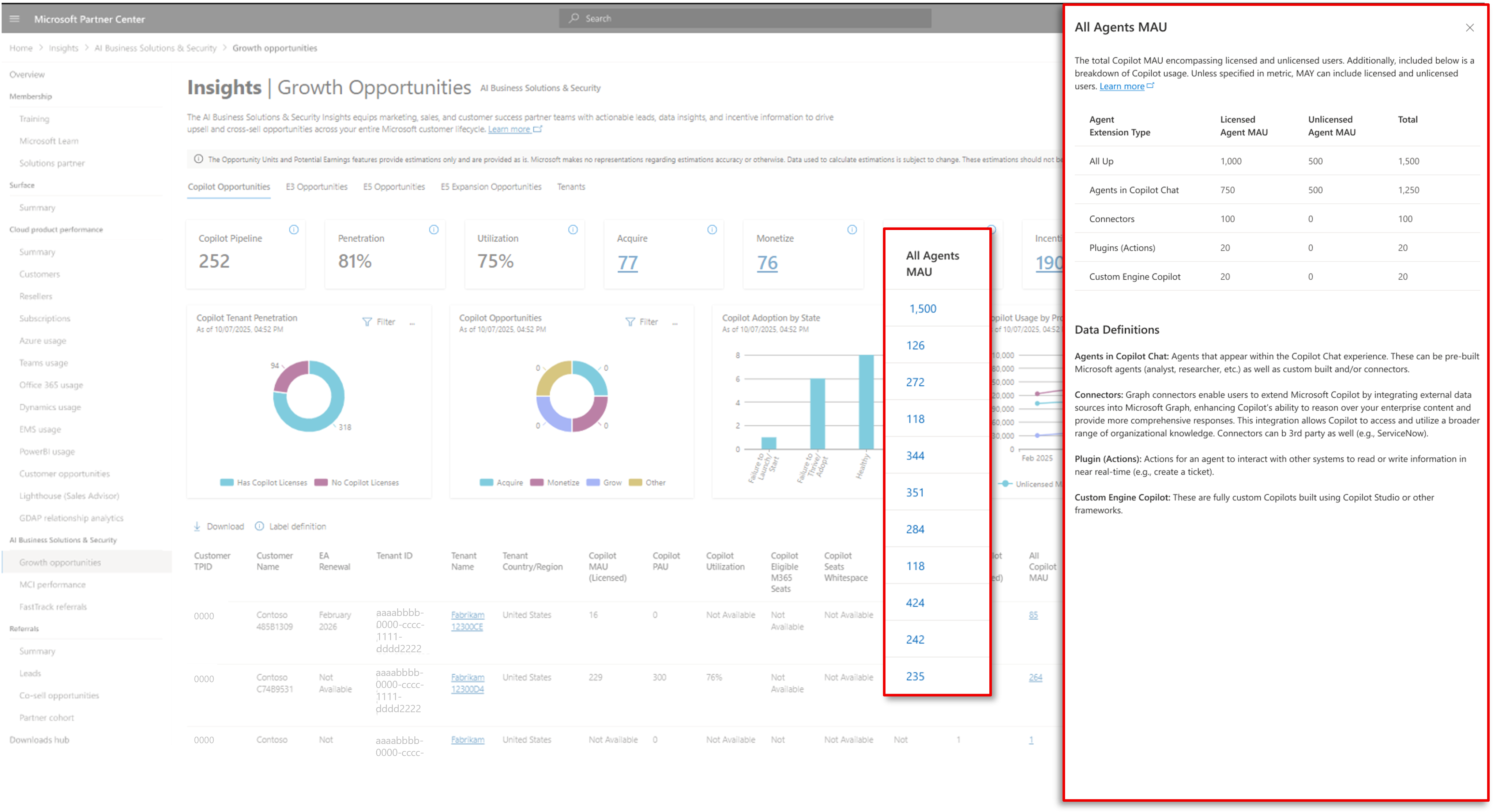
In addition to all up, agent MAU, the flyout pane gives a breakdown of licensed, unlicensed, and agent MAU by extension/application type:
All Up Agents Licensed MAU: Total agent MAU for Microsoft 365 Copilot licensed users.
All Up Agents Unlicensed MAU: Total agent MAU for users only without a Microsoft 365 Copilot license.
All Up Agents Total MAU: Total agent MAU for all users.
Agents in Copilot Chat Licensed MAU: Total agent MAU for Microsoft 365 Copilot licensed users, within the Copilot Chat applications.
Agents in Copilot Chat Unlicensed MAU: Total agent MAU for users only without a Microsoft 365 Copilot license, within the Copilot Chat applications.
Agents in Copilot Chat Total MAU: Total agent MAU for all users, within the Copilot Chat applications.
Connectors Licensed MAU: Connectors agent MAU for Microsoft 365 Copilot licensed users.
Connectors Unlicensed MAU: Connectors agent MAU for users only without a Microsoft 365 Copilot license.
Connectors Total MAU: Connectors agent MAU for all users.
Plugins (Actions) Licensed MAU: Plugins (Actions) agent MAU for Microsoft 365 Copilot licensed users.
Plugs (Actions) Unlicensed MAU: Plugins (Actions) agent MAU for users only without a Microsoft 365 Copilot license.
Plugins (Actions) Total MAU: Plugins (Actions) agent MAU for all users.
Custom Engine Licensed MAU: Custom engine agent MAU for Microsoft 365 Copilot licensed users.
Custom Engine Unlicensed MAU: Custom engine agent MAU for users only without a Microsoft 365 Copilot license.
Custom Engine Total MAU: Custom engine agent MAU for all users.
Customer data associations
Data in AI Business Solutions & Security Insights is limited to customers with whom partners have an established compliant association. A compliant association requires customer consent for data sharing, with availability of an opt-out option. Anonymized and derived data is only shared with customer consent. The specific associations configured in AI Business Solutions & Security Insights for data sharing purposes are outlined below.
Note
The Copilot Opportunities tab surfaces data for customer tenants that meet the following licensing criteria:
- Enterprise customers with more than 150 Microsoft 365 licenses, or
- Small Medium Enterprise & Channel (SME&C) with more than 25 Microsoft 365 licenses.
Any customer tenant meeting these license thresholds appears in ASPX, regardless of their Copilot license count.
| Association | Description |
|---|---|
| CPOR | If partners claimed one or more workloads via CPOR with a customer, they can view data in AI Business Solutions & Security Insights across all workloads and SKUs for the associated tenant. Once a new CPOR claim is completed, data will be available in AI Business Solutions & Security Insights in alignment with the timing outlined in this Data Refresh article. |
| Cloud Solution Provider (CSP) | If partners are the transacting partner as stated via an existing CSP association with a tenant, they can view data across all workloads and SKUs for the associated tenant. This includes: - CSP Tier 1 and Tier 2 associations - Monthly and annual billing cycles For new CSP associations, data will be available in AI Business Solutions & Security Insights in alignment with the timing explained in this Data Refresh article. |
| Enterprise Agreements (EA) | If a partner is the Licensing Solution Provider (LSP) transacting on an EA with a customer, the partner can only see the EA renewal dates. Other data is currently not provided due to lack of customer consent for data sharing. |
We're assessing and expanding to other association types as customer consent is obtained and will update this section when new associations are added to AI Business Solutions & Security Insights.
Notes on usage data
In some cases, Monthly Active Usage (MAU) is greater than Paid Available Units (PAU). This can occur for various reasons listed below:
Unpaid or Trial Users: Some workloads allow usage by users who don't hold paid licenses. For example, in the case of Microsoft 365 Copilot or Compliance workloads, features may be accessible to a broader set of users than those with paid entitlements. This leads to higher MAU counts compared to PAU.
Tenant-Level Policies: In security workloads like Microsoft Defender or IRM, tenant-wide policies may apply protections to all users or devices, regardless of licensing. This results in MAU counts that include users not covered by paid licenses.
Misconfigured or Missing Licensing Data: There are cases where licensing data is incomplete or misaligned. For instance, if IRM isn't configured but Communication Compliance (CC) is, MAU may still be reported due to CC activity, while PAU remains zero for IRM.
Over-Deployment or Over-Usage: In security and compliance workloads, over-deployment is common. For example, a product like Purview may be deployed across an organization, but only a subset of users are licensed. This is seen as a monetization opportunity to convert active users into paid ones.
Multiple Workload Attribution: Some workloads aggregate usage across multiple features (for example, MIP DLP, DLM, DNR under Purview). If users engage with any of these features, they may be counted in MAU even if only one feature is licensed, inflating MAU relative to PAU.
Note
Learn how to quickly identify and prioritize Copilot growth opportunities in the AI Business Solutions and Security Partner Center eXperience (ASPX) Partner Scenario Playbook at https://aka.ms/ASPXPlaybook. Inside this guide you’ll find a step‑by‑step view of when to use each scenario, what signals to look for, along with how to turn insights into concrete growth opportunities.
You can also explore the AI Business Solutions & Security Partner Center eXperience deck available at https://aka.ms/ASPXAIBS to learn more about the various ways to view the data within ASPX.