Note
Access to this page requires authorization. You can try signing in or changing directories.
Access to this page requires authorization. You can try changing directories.
Microsoft Purview supports data quality assessment on Apache Iceberg data assets. You can curate, govern, and scan Iceberg data on these storage sources:
- Azure Data Lake Storage Gen2
- Microsoft Fabric Lakehouse
- Amazon Web Services (AWS) S3
- Google Cloud Platform (GCP) Cloud Storage (GCS)
This article explains the Iceberg file structure, shows how to set up data quality scans, and lists tips for each catalog and storage type.
Iceberg file structure
An Iceberg table is more than just a collection of data files. It includes various metadata files that track the state of the table and facilitate operations like reads, writes, and schema evolution. An Iceberg table includes a catalog, a metadata layer, and a data layer. The data files in an Iceberg table are typically stored in columnar formats like Apache Parquet, Apache Avro, or Apache Optimized Row Columnar (ORC). These files contain the actual data that users interact with during queries.
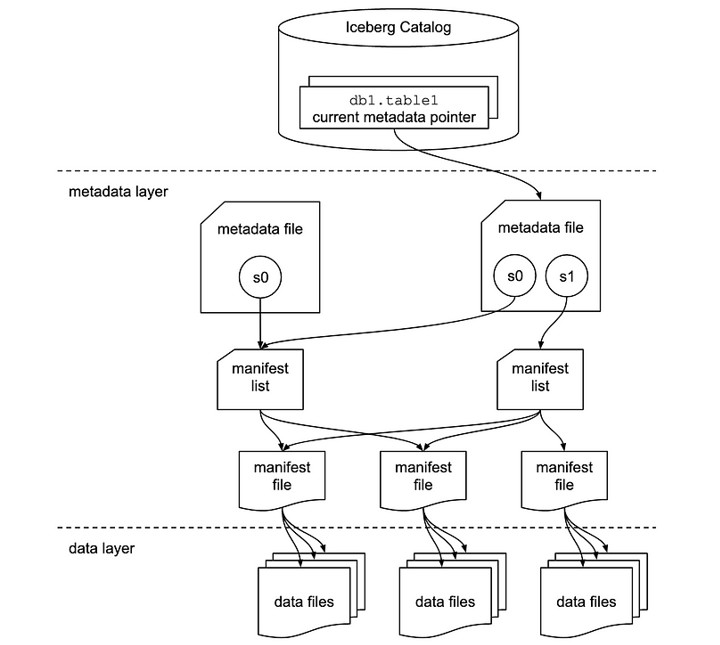
Catalog layer overview
The Iceberg catalog sits at the top of the hierarchy. It stores the current metadata pointer for each table. The catalog enables tracking the most recent state of a table by referencing the current metadata file.
Metadata layer overview
The metadata layer is central to Iceberg's functionality. It includes these key elements:
- Metadata file: Contains information about the table's schema, partitioning, and snapshots. In the diagram, s0 refers to a snapshot, a record of the table's state at a given point in time. If multiple snapshots exist (such as s0 and s1), the metadata file tracks both.
- Manifest list: Points to one or more manifest files. A manifest list acts as a container of references to these manifests. It helps Iceberg manage which data files should be read or written during different operations. Each snapshot might have its own manifest list.
Data layer overview
In the data layer, the manifest files act as an intermediary between the metadata and the actual data files. Each manifest file points to a collection of data files, providing a map of the physical files stored in the data lake.
- Manifest files: Store the metadata for a group of data files, including row counts, partition information, and file paths. They allow Iceberg to prune and access specific files quickly.
- Data files: Contain the actual data, stored in formats like Parquet, ORC, or Avro. Iceberg organizes data files based on partitions, which minimizes unnecessary data scans during query execution.
How Iceberg components work together
When you query or update data, Iceberg looks up the table's metadata file via the catalog. The metadata file references the current snapshot (or multiple snapshots). Each snapshot points to a manifest list, which references manifest files. The manifest files list the data files. This layered lookup lets Iceberg manage large datasets while keeping reads and writes consistent. Readers and writers always see a coherent table state. The snapshot-based design also enables time travel (querying earlier table states) and schema evolution.
The same layered approach boosts performance for batch and streaming operations. Only the needed data files are read, and updates use snapshots without changing the full dataset.
Iceberg data in OneLake
Important
Iceberg data in AWS S3 and GCS also needs to be auto synced as Delta to curate, govern, and to measure and monitor data quality.
You can seamlessly consume Iceberg-formatted data across Microsoft Fabric with no data movement or duplication. Use OneLake shortcuts to directly point to a data layer.
Iceberg data is stored in OneLake and written using Snowflake or another Iceberg writer. OneLake virtualizes the table as a Delta Lake table, which ensures broad compatibility across Fabric engines. For example, you can create a volume in Snowflake and point it directly to the Fabric Lakehouse. Once the Iceberg table is created in OneLake, autosync reflects data updates in real time. Get further details in Configure an Iceberg external volume for Azure in the Snowflake documentation.
Data quality for Iceberg data
For all users natively hydrating data in Iceberg on Parquet, ORC, or Avro on Data Lake Storage Gen2 or Fabric Lakehouse, configure a scan pointing to the ___location of the directory hosting the data and metadata Iceberg directories. To configure Iceberg data quality support, complete these steps:
- Configure and run a scan in Microsoft Purview Data Map.
- Configure the directory hosting data and metadata as a data asset and associate it to a data product. Associating the directory as a data asset and linking it to a data product forms the Iceberg dataset. Learn to associate data assets to a data product.
- In Unified Catalog, under Health management select Data quality view to find your Iceberg files (data asset) and to set up data source connection.
- To set up a Data Lake Storage Gen2 connection, follow the steps in Set up data source connection for data quality.
- To set up a Fabric OneLake connection, follow the steps in Set up data quality for Fabric Lakehouse data.
- On the Schema page of the selected Iceberg file (data asset), select Import schema to import the schema from the data source.
- On the Iceberg file's Overview page, at the Data asset dropdown menu, select Iceberg.
- Apply data quality rules, and run data quality scans for column- and table-level data quality scoring.
Profiling and data quality scanning
Important
Before you run data profiling or data quality scans, you need to retrieve and set the schema from the Data Quality Schema page. Consumers don't see the schema in the data asset view because Data Map doesn't yet support the Iceberg open table format. Data Quality stewards can import the schema from the Data Quality schema page.
After you finish the connection setup and data asset file format selection, you can profile your data, create and apply rules, and run a data quality scan of your data in Iceberg open format files. For step-by-step guidance, see the following articles:
Important
Support for the Iceberg open format in catalog discovery, curation, data profiling, and data quality scanning features is in preview.
Current limitations for Iceberg data quality
The current preview release of Microsoft Purview supports data created in Iceberg format with Apache Hadoop catalog (a file-based catalog implementation) only. Snowflake catalog scenarios are supported only through Delta virtualization using OneLake shortcuts.
Lakehouse Path and Data Lake Storage Gen2 Path
Iceberg Metadata stores the complete path for the data and metadata. Ensure you use the complete path for Data Lake Storage Gen2 and Fabric Lakehouse. Additionally for Fabric Lakehouse path during the write, ensure operating (WRITES, UPSERTS) with the ID paths. The following example shows the required ABFSS path format. Replace
<filesystem-ID>and<lakehouse-ID>with your actual GUIDs:abfss://<filesystem-ID>@onelake.dfs.fabric.microsoft.com/<lakehouse-ID>/Files/CustomerDataFilesystem as ID and Lakehouse as ID. Absolute and not relative paths are necessary for Microsoft Purview to perform data quality on Iceberg. To validate, ensure you check the snapshots path to point as complete Fully Qualified Name (FQN) paths.
Schema detection
- Data Map can't detect the Iceberg schema. When curating the Iceberg directories on Fabric Lakehouse or Data Lake Storage Gen2, you can't review the schema. However, the data quality fetch schema can pull up the schema for the curated asset.
Recommendations for Iceberg data quality configuration
Choose the approach that matches your catalog and storage:
| Source/Catalog | Storage | Approach | Supported formats |
|---|---|---|---|
| Snowflake Catalog | Data Lake Storage Gen2, AWS S3, or GCP GCS (VOLUME) | Use a Fabric OneLake Table shortcut. Run data quality as a Delta table. | Parquet only |
| Hadoop catalog | Data Lake Storage Gen2 | Scan the directory directly. Use the Iceberg engine for data quality. | Parquet, ORC, Avro |
| Snowflake | Fabric Lakehouse (VOLUME pointed to Lakehouse) | Use OneLake Table to create a Delta-compatible version. | Parquet only |
| Hadoop catalog | Fabric Lakehouse | Scan the Lakehouse directory directly. Use the Iceberg engine for data quality. | Parquet, ORC, Avro |
Related resources
These articles cover data quality setup and scanning: