Note
Access to this page requires authorization. You can try signing in or changing directories.
Access to this page requires authorization. You can try changing directories.
Domain controller ___location refers to the algorithm the client machine uses to find a suitable ___domain controller. Domain controller ___location is a critical function in all enterprise environments to allow client authentication with Active Directory.
In this article, learn about the ___domain controller locator process, including discovery, closest site detection, and configuration of NetBIOS ___domain name mappings.
Domain controller locator process
The ___domain controller locator (DC locator) algorithm consists of two parts:
Locator finds which ___domain controllers are registered.
Locator submits a query to locate a ___domain controller in the specified ___domain.
An LDAP User Datagram Protocol (UDP) lookup is then sent to one or more of the ___domain controllers listed in the response to ensure their availability. Finally, the Netlogon service caches the discovered ___domain controller to aid in resolving future requests.
Discovery process
Active Directory domains always have two distinct names: the DNS fully qualified ___domain name (FQDN) and the NetBIOS ___domain name. NetBIOS ___domain names have legacy length and other constraints. For example, NetBIOS domains are limited to 15 characters.
The NetBIOS ___domain name of an Active Directory ___domain doesn't need to be the same as the Active Directory ___domain's FQDN. For example, an Active Directory ___domain's FQDN might be contoso.com, but the ___domain might have a NetBIOS ___domain name of fabrikam.
DC ___location in Windows can operate in two basic modes:
DNS-based discovery is based on ___domain controller advertisement using DNS.
Domain controllers register various SRV records in DNS, such as records that represent key capabilities like Key Distribution Center or Global Catalog, and records that describe locality, like Active Directory site records. Clients query DNS for the appropriate SRV records and then ping those servers by using UDP-based LDAP pings.
This mode is supported only when you use DNS ___domain names and your ___domain controllers are running Windows 2000 and later. Supported ___domain controllers run more optimally in this mode but can change to the other mode in certain scenarios.
NetBIOS-based discovery involves ___domain controllers registering records in Windows Internet Name Service (WINS). Clients query WINS for the appropriate records, followed by pinging the possible target candidate DCs. A variant of this mode uses a broadcast mechanism supported by mailslot messages where the client broadcasts packets on its local network to look for DCs.
Important
When an application requests a DC but specifies a short NetBIOS-style ___domain name, DC ___location always tries to map that short ___domain name to a DNS ___domain name. If DC ___location can map the ___domain names successfully, it uses DNS-based discovery with the mapped DNS ___domain name.
NetBIOS-style ___domain names are mapped to DNS ___domain names from multiple sources, in the following order:
Cached information from a previous lookup
All domains in the current forest
Top-level names (TLNs) for all trusting forest trusts and external trusts
For Windows Server 2025 and later:
Administrator-configured ___domain name mappings
Domain name mappings for all forests and child domains in trusting forest trusts
Sign-in sessions on the client machine
When none of these sources can find a DNS ___domain name, DC ___location can proceed with NetBIOS-based discovery by using the original NetBIOS-style short ___domain name
Beginning with Windows Server 2025, Netlogon downloads and caches naming information about domains and child domains in all trusting forests. This information is used when you're mapping NetBIOS-style ___domain names to DNS ___domain names.
We recommend using DNS-based discovery instead of NetBIOS-based discovery. DNS-based discovery is more reliable and secure. DsGetDcName is the primary DC ___location API.
Important
Beginning with Windows Server 2025, DC locator doesn't allow the use of NetBIOS-style ___location. To learn how to configure this behavior, see the NetBIOS discovery policy setting section in this article.
To learn about the discovery process, select the tab that corresponds to the method you want to learn about.
The process that the locator follows can be summarized as follows:
On the client (the computer that's locating the ___domain controller), the locator is initiated as a remote procedure call (RPC) to the local Netlogon service. The Netlogon service implements the Locator API (
DsGetDcName).The client collects the information that's needed to select a ___domain controller and passes the information to the Netlogon service by using the
DsGetDcNameAPI.The Netlogon service on the client uses the collected information to look up a ___domain controller for the specified ___domain. The lookup process uses one of the following two methods:
Netlogon queries DNS by using the IP/DNS-compatible locator.
DsGetDcNamecalls the DnsQuery call to read the Service Resource (SRV) records and A records from DNS after it appends the ___domain name to the appropriate string that specifies the SRV records.When a workstation signs in to a Windows-based ___domain, it queries DNS for SRV records in the format
_<service>._<protocol>.<DnsDomainName>. Clients querying DNS for an LDAP server for the ___domain using the following format, whereDnsDomainNameis the ___domain name._ldap._tcp.DnsDomainName
The Netlogon service sends a datagram as an LDAP UDP search to the discovered ___domain controllers that register the name.
Each available ___domain controller responds to the datagram to indicate that it's currently operational and then returns the information to
DsGetDcName.The Netlogon service returns the information to the client from the ___domain controller that responds first.
The Netlogon service caches the ___domain controller information so that it isn't necessary to repeat the discovery process for subsequent requests. Caching this information encourages the consistent use of the same ___domain controller and, thus, a consistent view of Active Directory.
NetBIOS discovery policy setting
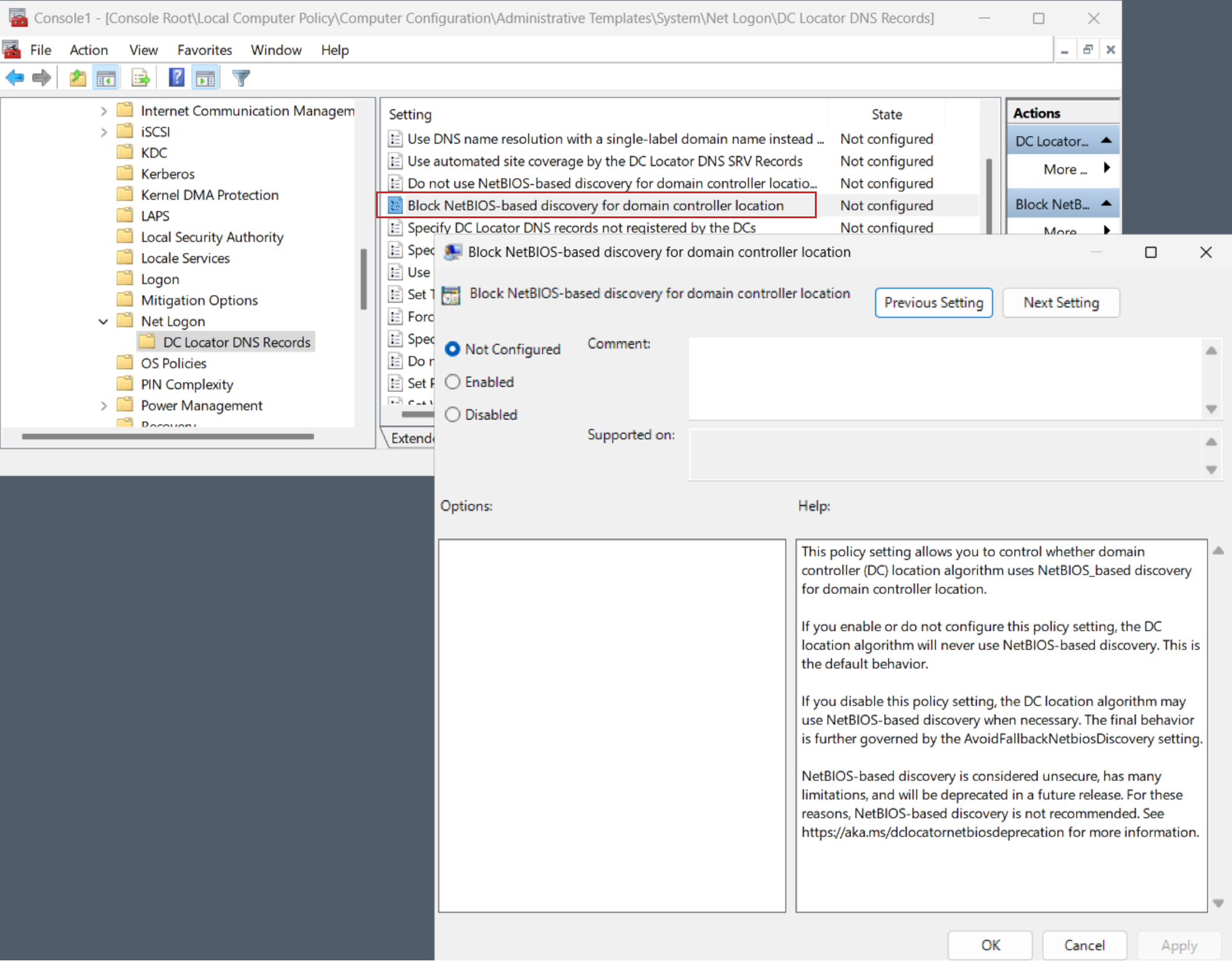
Beginning with Windows Server 2025, DC locator doesn't allow the use of the NetBIOS-based discovery. BlockNetBIOSDiscovery is a new Group Policy setting for the Netlogon service that allows administrators to control this behavior. To access the policy in Group Policy Management Editor, go to Computer Configuration > Administrative Templates > System > Net Logon > DC Locator DNS Records > Block NetBIOS-based discovery for ___domain controller ___location.
The following settings apply to BlockNetBIOSDiscovery:
TRUE(default): DC locator doesn't allow the use of NetBIOS-style DC ___location.FALSE: DC locator allows the use of WINS or mailslot-based discovery if all legacy constraints also allow it.
You use the BlockNetBIOSDiscovery setting to enforce a secure-by-default posture for DC ___location. We recommend that you keep it set to TRUE. Disable it only for temporary periods while you're pursuing other mitigations.
The new policy setting looks like this:
Tip
You can separately enable or disable the ability to use mailslots on a machine-wide basis by using the SMB EnableMailslots policy setting. For DC locator to be able to use mailslots for DC discovery, you must enable mailslots at the SMB level and disable BlockNetBIOSDiscovery. You can query and set the EnableMailslots setting by running the Get-SmbClientConfiguration and Set-SmbClientConfiguration PowerShell cmdlets.
Closest Active Directory site
After the client locates a ___domain controller, it establishes communication by using LDAP to gain access to Active Directory. As part of that negotiation, the ___domain controller identifies which site the client is in based on the client's IP subnet.
If the client is communicating with a ___domain controller that isn't in the closest, most optimal site, the ___domain controller returns the name of the client's site. If the client has already tried to find ___domain controllers in that site, the client uses a ___domain controller in a less optimal site instead. For example, the client sends a DNS Lookup query to DNS to find ___domain controllers in the client's subnet. Otherwise, the client does a site-specific DNS lookup again with the new optimal site name. The ___domain controller uses some of the directory service information for identifying sites and subnets.
The client caches the ___domain controller entry. If the ___domain controller isn't in the optimal site, the client flushes the cache after 15 minutes and discards the cache entry. It then attempts to find an optimal ___domain controller in the same site as the client.
After the client establishes a communications path to the ___domain controller, it can establish the sign-in and authentication credentials. If necessary, the client can also set up a secure channel for Windows-based computers. The client is now ready to perform normal queries and search for information against the directory.
The client establishes an LDAP connection to a ___domain controller to sign in. The sign-in process uses Security Accounts Manager. The communications path uses the LDAP interface, and a ___domain controller authenticates the client. After that, the client account is verified and passed through Security Accounts Manager to the directory service agent, then to the database layer, and finally to the database in the Extensible Storage Engine (ESE).
Configuring NetBIOS ___domain name mappings
Beginning with Windows Server 2025, forest administrators can configure custom mappings from DNS ___domain name to NetBIOS ___domain name. Administrator-configured mappings at the forest level are an optional mechanism that you should use only when all other options are insufficient. For example, if an application or environment requires other ___domain name mappings that other sources can't automatically provide.
The custom ___domain name mappings are stored in a serviceConnectionPoint object located in the naming context for the Active Directory configuration. For example:
CN=DCLocatorDomainNameMappings,CN=Windows NT,CN=Services,CN=Configuration,DC=contoso,DC=com
The msDS-Settings attribute of this serviceConnectionPoint object can contain one or more values. Each value contains the DNS ___domain name and the NetBIOS ___domain name, separated by a semicolon, as in dnsdomainname.com:NetBIOSdomainname.
For example:
contoso.com:fabrikamtatertots.contoso.com:totstailspintoys.com:tailspintoys
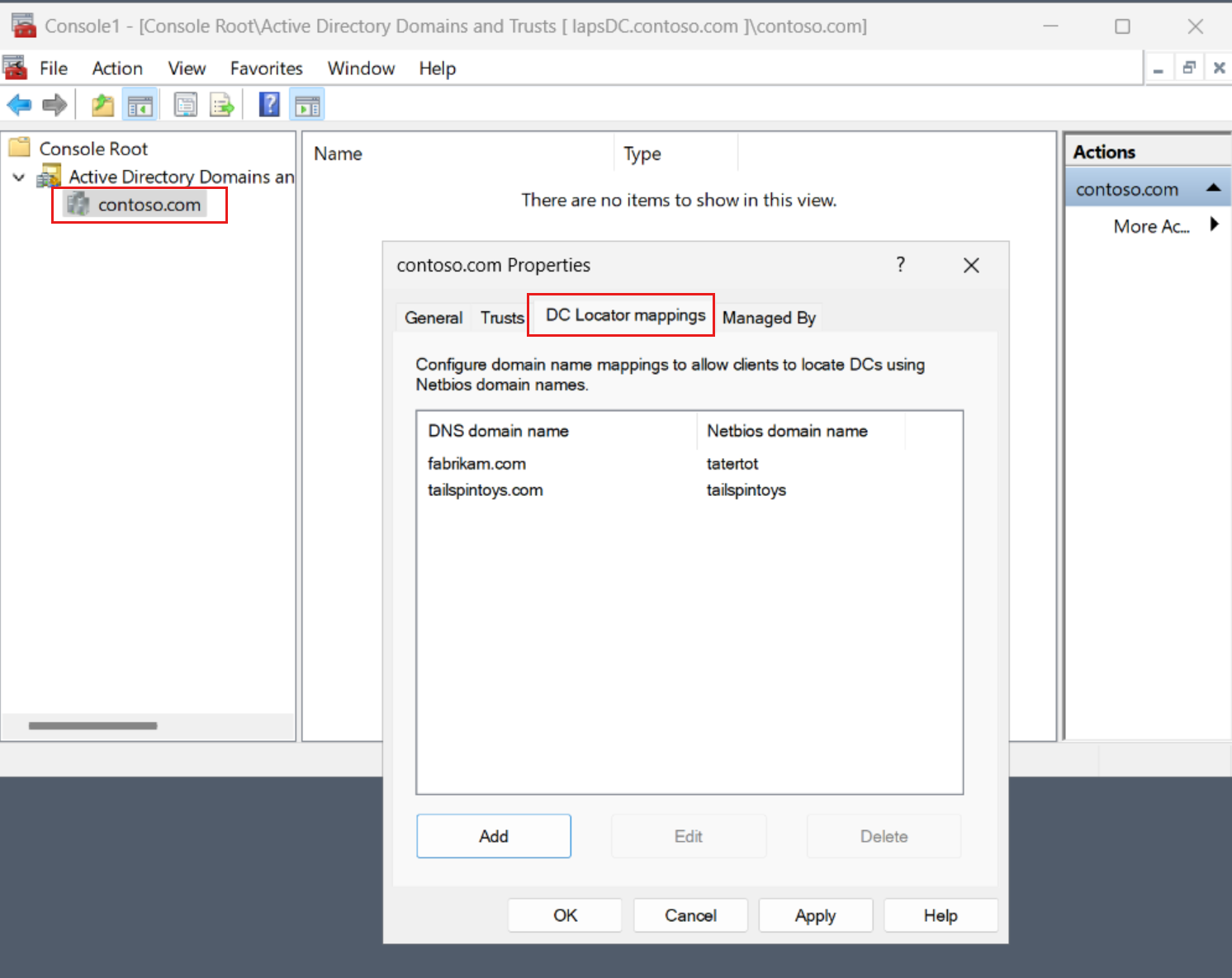
You can configure these mappings in the Active Directory Domains and Trusts management settings by following these steps:
- Right-click the ___domain.
- Select Properties.
- Select the DC locator mappings tab.
The Netlogon service on clients then downloads and caches the custom mappings in the DCLocatorDomainNameMappings object every 12 hours. The service automatically uses this information when you're mapping NetBIOS-style ___domain names to DNS ___domain names.
The new Active Directory Domains and Trusts management page looks like this:
Important
Configure administrator-configured forest-level ___domain name mappings only when you're sure that all other name mapping sources are insufficient. As a general rule, such arbitrary mappings are necessary only when no trust relationship exists between clients and the target domains, and client applications can't be migrated to specifying DNS-style ___domain names.